A new region always looks clean on paper. Then six months in, the problems start to surface, under-floor cooling paths block new fiber runs, redundant feeds share the same substation, and the as-built package no longer matches what's in the racks. That is how data center infrastructure design decisions compound, especially for hyperscale operators, carriers, and ISPs that expect a build to absorb growth for the next decade or more.
The best best practices for data center infrastructure design are the ones that survive real operations. They make room for new fiber, keep power and cooling independence honest, reduce rework, and give the operations team something they can maintain when the pressure is on. The ten practices below separate facilities that scale cleanly from facilities that become a constraint on every future expansion.
1. Modular and Scalable Architecture Design
A new module should fit the way a site grows. Hyperscale operators do not expand in tidy steps, and carriers rarely add meet-me-room load on a schedule that matches the original shell. Build around a primary expansion unit that can be added, tested, and turned up without forcing a redesign of the rest of the facility.
The best modular programs start with a clear Basis of Design, early input from the operations team, and independent commissioning before turnover. That is the discipline Uptime Institute pushes in its design guidance, because it reduces change orders and makes ownership clear across design, construction, and operations (Uptime Institute design guidance). The same guidance reflects the move toward standardized delivery, and for a new large data center of 20 MW or more, provisioning now averages 9 to 10 months globally. Modularity is an operating model as much as a construction method.
Practical rule: Size each module to the primary expansion unit, then lock the power, cooling, and cabling templates so the next module behaves like the first one.
For faster deployment with proven speed and cost of modular data centers, see this resource to understand prefabrication timelines. It is a useful reference when the schedule matters more than custom steel.
A carrier-grade module also needs physical discipline. Put splice trays, distribution paths, and service clearances on paper before the first rack arrives, not after the first outage. If you are coordinating a regional build or a fiber-heavy fit-out, Southern Tier Resources is one example of a partner that works in that construction-to-documentation space.
2. Redundant Power and Cooling Infrastructure
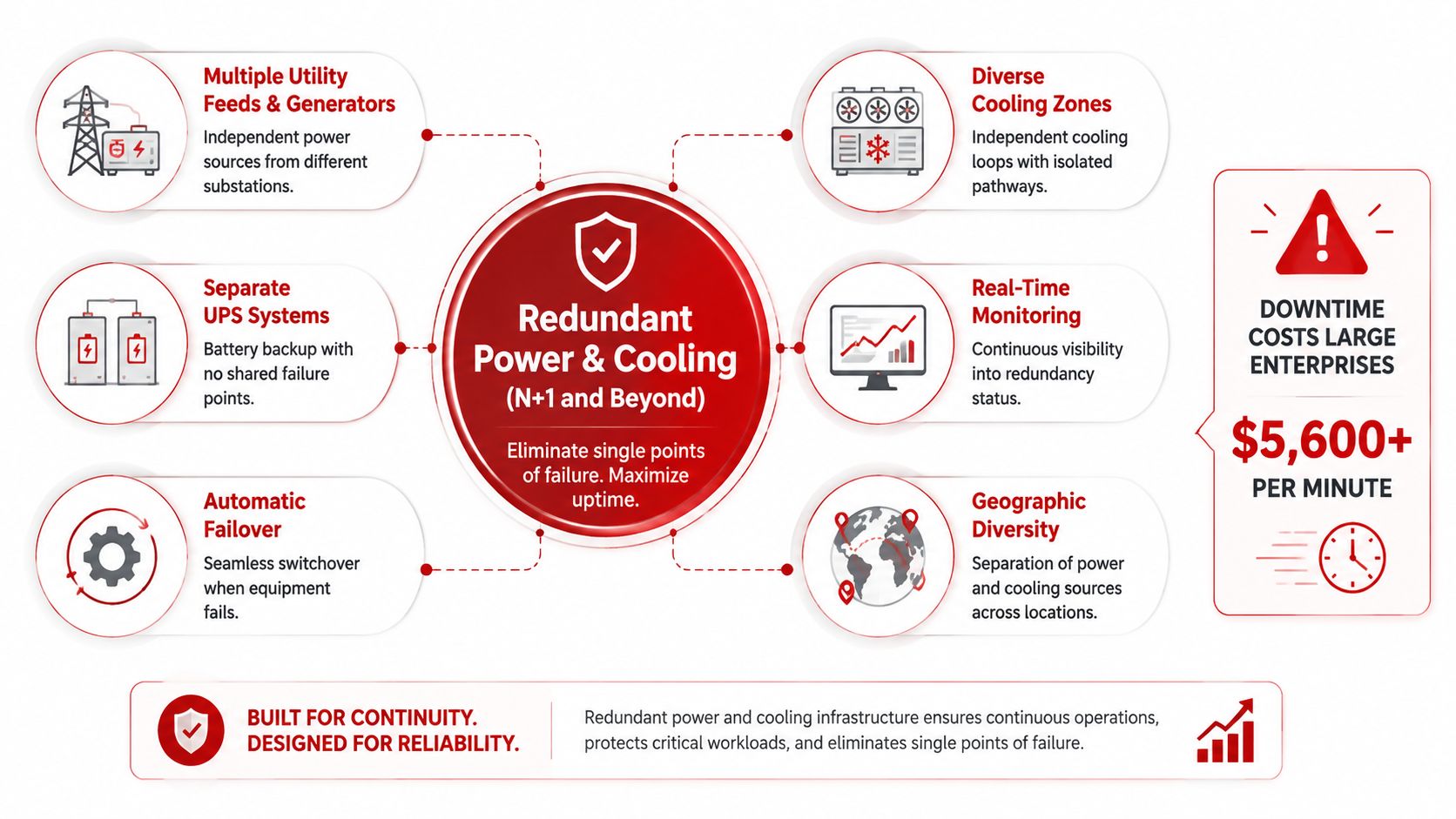
Redundancy is only useful if the alternate path is independent. Too many “redundant” designs share utility intake, substation gear, or a cooling dependency that collapses the room the moment one common component fails. In the field, that usually means someone drew two paths, but the physical dependency map was never forced through a failure scenario.
The clean way to design it is to trace every power and cooling path back to its source, then ask what still fails together. Separate utility substations or providers help, but so do isolated cooling loops, independent compressors, and real switching procedures that operators can execute without guessing. For critical carrier and ISP environments, that means the redundancy matrix needs to be treated as a living document, not a compliance artifact.
Validate the hidden single points
A good redundancy plan includes more than nameplate capacity. It includes real-time monitoring of redundancy status, regular failover tests, and documented manual override steps that the night shift can follow under pressure. It also includes geographic diversity when you can get it, because a water-cooled system and an air-cooled system don't fail the same way.
Redundancy that hasn't been failover-tested is a hope, not a design.
Use the operations team to break the plan early. A planned failover that exposes a bad valve label or a shared breaker is cheap. A production outage that reveals the same problem is not. For build coordination and fit-out support, Southern Tier Resources belongs in the same conversation as the electrical and mechanical contractors, because these paths have to be integrated, not handed off in silos.
3. High-Density Cooling and Hot/Cold Aisle Containment
A room full of cold air looks fine until rack density climbs and airflow starts escaping around the edges. At that point, you are paying to cool empty space while the hottest servers still see uneven intake temperatures. Hot and cold aisle separation is the first fix because it recovers capacity before anyone starts shopping for more exotic gear.
Historical PUE data shows why containment pays off. Early data centers often ran at roughly PUE 2.5 or higher, which meant about 1.5 watts of overhead for every 1 watt delivered to IT load. By 2012, best-in-class enterprise facilities had pulled PUE down to around 1.6 to 1.7 through better airflow management, containment, and cooling strategies, according to historical PUE analysis. That same analysis also pointed to early facilities at about 50 W/sq ft, with over 75% of total power going to facility energization, including 51% for server and related equipment and 25% for cooling. The lesson is simple, right-size the airflow path before you add hardware.
For carriers and ISPs, that trade-off shows up fast in high-density rows. If the aisle plan is sloppy, the facility starts spending power to move air that never reaches the equipment. Blank panels, disciplined cable routing, and temperature sensors in both hot and cold aisles usually buy more usable density than a rushed containment build.
Containment also tells you whether liquid cooling is needed, or just fashionable. I have seen teams skip that check and buy complexity too early. A clean containment layout, tight cable management, and sensors placed where operators can act on them do more for real-world density than a loose design that only works on paper.
The image below shows how power, cooling, monitoring, and failover fit into one operating model.
4. Network Architecture and Fiber-Optic Backbone
Leaf-spine works because it respects the way modern workloads move. It avoids the bottlenecks of old hierarchical designs and gives you a fabric that can scale without forcing every new service to fight for bandwidth. For carriers and ISPs, the network is not a side system, it's the product, so the fiber backbone has to be designed as carefully as the power plant.
Design the spine layer with enough switch capacity to avoid oversubscription, and keep the leaf-to-spine paths redundant. Use equal-cost multipath routing where it fits, separate the management fabric from production traffic, and build the fiber routes with spare capacity for future growth. A good fiber plan is not just a matter of count, it's a matter of how quickly you can prove what strand goes where when a circuit alarms at 2 a.m.
Build for inspection, not just installation
Standardized termination panels, strand-level mapping, and testing on every install turn a fiber plant into something the NOC can trust. Failure mode in large builds is not only broken glass, it's undocumented cross-connects that slow down every turn-up after go-live.
The right mental model is a fabric that supports workload placement and carrier services at the same time. Multi-path routing, geographically diverse paths for critical links, and high-count fiber cables all belong in the same design review. A clean example of dense fiber organization is visible in the image below.
5. Physical Security and Access Control Design
Physical security fails when it's treated as a front-door problem. A serious data center needs zones that reflect real operational roles, visitor, tech, restricted equipment, staging, and disposal. That way, the person who needs to replace a patch cord doesn't get the same access as the person who can touch core infrastructure.
Badge readers, surveillance, environmental sensors, visitor escort procedures, and secure disposal controls should all be designed together. In carrier and financial services environments, that matters because the audit trail is part of the service promise, not just a compliance checkbox. Access logs should tie back to change management so that when someone opens a cabinet, there's a record of why they were there.
Security should slow the wrong person down, not the right one
Time-locks, escort limits, and door sensors help, but only if the workflow matches operations. If staff have to fight the access system to do routine work, they'll find workarounds. Workarounds are where security debt starts.
The best designs also account for spare parts, staging, and decommissioning. You need a secure place for cable stock, replacement optics, and retired drives, plus a documented destruction process for anything leaving the site. Quarterly or semi-annual audits catch the drift before it becomes a breach.
6. Software-Defined Infrastructure and Management Automation
Automation should make the site easier to run, not harder to understand. The most useful deployment pattern starts with DCIM, because you need baseline visibility before you can trust a more ambitious Infrastructure-as-Code approach. Once the facility telemetry is reliable, templates and version control can do the work of keeping configurations consistent.
That's the operational advantage for hyperscale and colo teams alike. Repeating the same provisioning steps by hand creates drift, and drift is what breaks the clean separation between engineering intent and what's live in the room. If a change is worth making, it's worth capturing as code, tested before production, and traceable after the fact.
Practical rule: Automate the boring changes first, then automate the risky ones only after the rollback path is proven in the same environment.
Integrate the automation stack with change management, incident response, and security controls so the system can't provision something it shouldn't. Also design the management plane with redundancy, because a single control point that goes dark can be just as damaging as a failed fan tray. The point is not to eliminate operators, it's to let them work from evidence instead of guesswork.
7. Sustainable Energy and Efficiency Design
Sustainability only holds up when it is built into the power and cooling stack, not bolted on as a policy memo. In real facilities, the work starts with telemetry, right-sized power paths, and cooling equipment that tracks load instead of running flat out. ISO/IEC 30134-2:2026 defines PUE measurement, calculation, and reporting in a consistent way across sites, so it remains the standard benchmark for data center energy efficiency.
The U.S. Department of Energy data center efficiency guidelines point to the levers that matter on the floor, raise compute inlet temperature within equipment thermal limits, use free cooling where the climate supports it, and tune fan, pump, and UPS efficiency. Independent 2026 coverage places efficient modern builds around PUE 1.2 to 1.4, with top hyperscale sites reported near 1.1 to 1.15. That makes PUE 1.2 or better a practical target for new enterprise and hyperscale designs. Those figures are not a vanity score. They are the result of getting the cooling and power chain under control before calling the site sustainable.
Design for efficiency and future procurement
ESG work also includes utility coordination, renewable energy options, and expansion planning for later PPAs or site additions. Variable-speed drives, modular UPS behavior, and free cooling where climate permits all cut waste without turning the room into a science project. The trade-off is straightforward. You may spend more effort up front on site selection and utility planning, but you avoid paying for inefficiency every hour the facility runs.
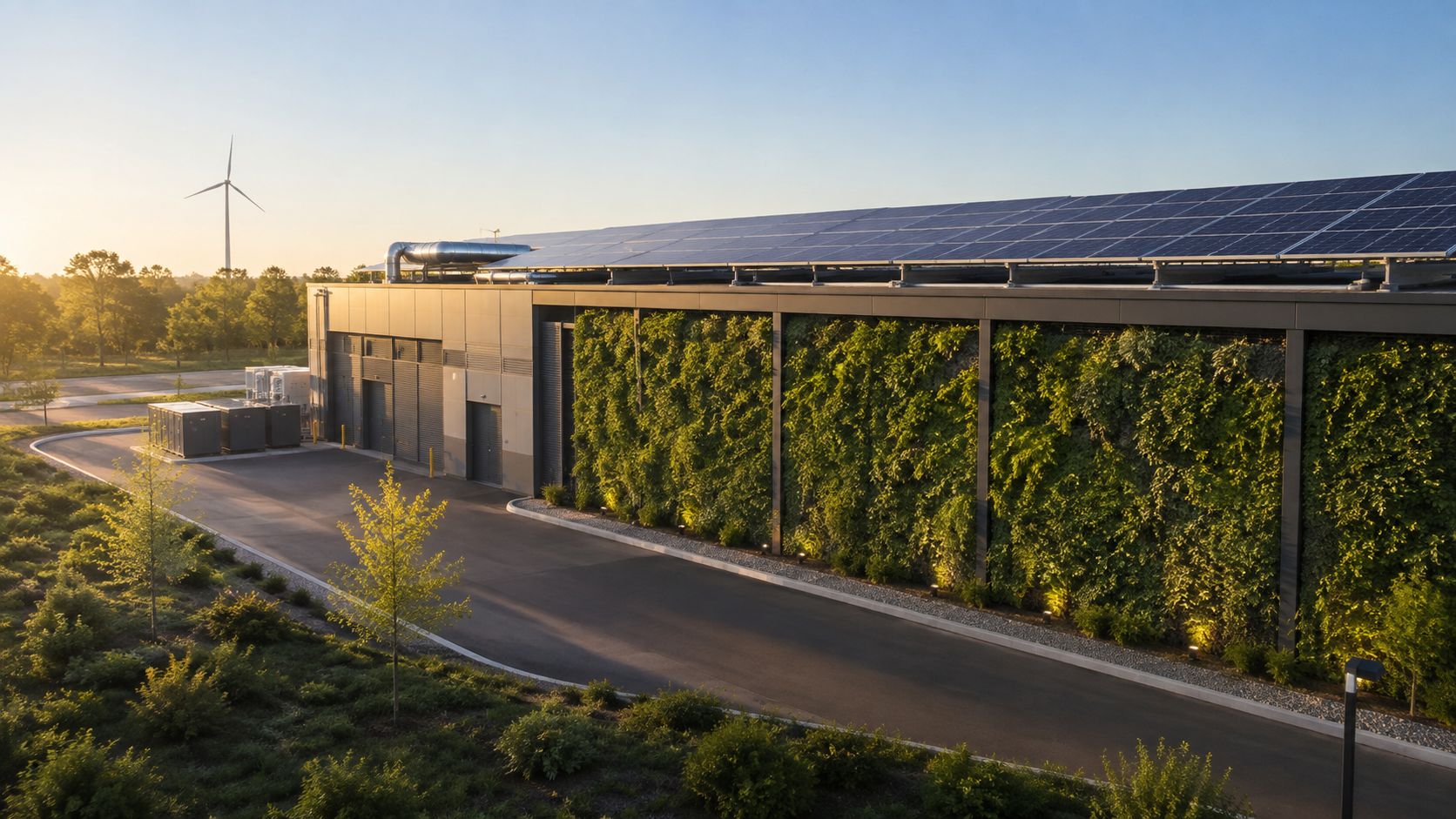
The green facility image below shows what that looks like when the site plan is done well.
8. Standardized Rack and Cable Management
Standardization is what makes a facility maintainable after the excitement of launch fades. When rack layouts, naming conventions, cable colors, and port maps are consistent, new technicians can work faster and senior technicians stop wasting time deciphering someone else's improvisation. In carrier hotels and multi-tenant environments, that discipline also reduces the risk of accidental cross-connect mistakes.
Use one rack elevation template per equipment class, then stick to it. Put power, network, and management cables on distinct color paths, keep route maps current, and treat barcode or RFID asset tracking as part of the physical record. The point is not aesthetic perfection, it's troubleshooting speed and change safety.
Documentation has to match the steel
A pretty rack photo doesn't help when a remote hands tech needs to identify the exact port under pressure. Quarterly audits catch the drift between documentation and reality, and change control should require the documentation update before the deployment is signed off. That sequence matters because post-change cleanup is where most physical infrastructure debt accumulates.
For hyperscale teams, standardized racks also simplify hardware refreshes and staff training across sites. For ISPs, they make turn-ups and circuit tracing faster. For enterprise teams, they keep the room readable when multiple vendors work inside it.
9. Multi-Site Resilience and Disaster Recovery Design
A single site is a single failure domain, even when it looks overbuilt. Multi-site resilience gives you geographic separation, automated failover, and a way to keep serving traffic when a regional event hits the wrong part of the map. The hard part is not building the second site, it's deciding what has to move, what can wait, and what the business can tolerate.
Define RTO and RPO before you choose the topology. If the failover is manual, rehearse it until the sequence is boring. If it's automated, validate that the automation doesn't create consistency problems or traffic black holes during the transition. Use geographically diverse carrier circuits so the backup path doesn't share the same weakness as the primary.
A disaster recovery design is only real after a full failover test proves the playbook works under pressure.
The strongest designs also avoid wasting money on cold standby where active/active makes more sense. That said, not every workload can tolerate the latency trade-off, so the architecture has to reflect the application, not the org chart. Quarterly testing is what keeps the design honest.
10. Complete Monitoring, Alerting, and Observability Systems
A site can look healthy on the dashboard and still be drifting toward failure. I've seen facilities with clean IT graphs mask a cooling issue in the white space, and I've seen building alarms fire while application latency stayed hidden until carriers started taking calls. The fix is to monitor the plant, the network, and the workload together.
Set baselines before you write alert logic. Then use layered thresholds so warning chatter does not bury a real event. Correlate temperature, humidity, power, packet loss, bandwidth, and application behavior, and keep enough history to spot recurring environmental swings. Observability is less about more charts and more about faster root-cause isolation.
Make the alert path operational, not decorative
Every high-priority alert needs a runbook beside it, and the on-call rotation needs a clear escalation path. Dashboards should face operations, management, and customer teams, so everyone works from the same live picture when traffic shifts or a chiller starts to drift. Teams looking to improve incident response with observability can reference this guide for practical alert correlation strategies.
For sites where fiber density, carrier handoffs, and plant reliability all matter, Southern Tier Resources is a useful reference point. Observability only pays off when the physical plant, the fiber plant, and the documentation all line up.
10-Point Data Center Design Best Practices Comparison
| Solution | Implementation Complexity (🔄) | Resource Requirements (⚡) | Expected Outcomes (⭐ / 📊) | Ideal Use Cases (💡) | Key Advantages (⭐) |
|---|---|---|---|---|---|
| Modular and Scalable Architecture Design | Medium–High, upfront planning and standardization 🔄 | Moderate, phased capex, standardized modules, integration effort ⚡ | Scalable capacity growth; improved ROI and faster deployments 📊 | Hyperscale/cloud phased builds; growth-aligned expansions 💡 | Rapid expansion, easier maintenance, testable isolated modules ⭐ |
| Redundant Power and Cooling Infrastructure (N+1 and Beyond) | High, complex redundancy design and failover testing 🔄 | Very High, duplicate systems, space, ongoing maintenance ⚡ | Extreme uptime (99.99%+); maintenance without downtime ⭐ / 📊 | Mission-critical sites (finance, healthcare, carrier hotels) 💡 | Fault tolerance, SLA support, longevity of operations ⭐ |
| High-Density Cooling & Hot/Cold Aisle Containment | Medium–High, physical reconfiguration and containment design 🔄 | High, containment hardware, advanced cooling (possible liquid), training ⚡ | Higher kW/rack, 20–40% energy savings, improved PUE 📊 | AI/ML clusters, GPU-dense racks, capacity-constrained sites 💡 | Increased compute density, reduced cooling cost, better equipment life ⭐ |
| Network Architecture & Fiber-Optic Backbone | High, fabric design, routing, and operational complexity 🔄 | High, fiber counts, high-speed switches, specialized splicing and tools ⚡ | Non-blocking bandwidth, low latency, scalable interconnectivity ⭐ / 📊 | Carrier-neutral, cloud fabrics, heavy east–west traffic environments 💡 | Future-proof bandwidth, carrier integration, horizontal scaling ⭐ |
| Physical Security and Access Control Design | Medium, systems integration and policy enforcement 🔄 | Moderate–High, access systems, cameras, staffing, monitoring ⚡ | Strong asset protection, compliance readiness, audit trails 📊 | Regulated industries, colocation, sensitive-data facilities 💡 | Prevents unauthorized access, supports compliance and prosecution ⭐ |
| Software-Defined Infrastructure & Management Automation | High, integration, IaC adoption, cultural change 🔄 | Moderate–High, DCIM/IaC tools, licenses, training, redundancy ⚡ | Faster deployments, fewer errors, centralized visibility and optimization 📊 | Cloud-native ops, multi-site management, frequent provisioning 💡 | Repeatability, reduced MTTR, programmable operations ⭐ |
| Sustainable Energy & Efficiency Design (Green Infrastructure) | Medium, energy integration and site studies required 🔄 | High, renewables, efficient equipment, possible site constraints ⚡ | Lower energy costs, improved PUE (≈1.1–1.2), emissions reduction 📊 | ESG-driven projects, operators seeking long-term OPEX savings 💡 | Reduced OPEX, incentives/tax credit eligibility, market differentiation ⭐ |
| Standardized Rack & Cable Management | Low–Medium, policy and discipline to enforce standards 🔄 | Low–Moderate, racks, labeling, documentation, modest tooling ⚡ | Faster MTTR, consistent deployments, fewer cable-related failures 📊 | Multi-site rollouts, operator-heavy maintenance environments 💡 | Easier troubleshooting, consistent onboarding, airflow improvements ⭐ |
| Multi-Site Resilience & Disaster Recovery Design | Very High, complex cross-site orchestration and testing 🔄 | Very High, multiple sites, replication, network diversity, ops ⚡ | Geographic continuity, regulatory compliance, high availability ⭐ / 📊 | Global services, regulated industries, DR-critical applications 💡 | Geographic redundancy, reduced outage risk, rolling upgrades possible ⭐ |
| Comprehensive Monitoring, Alerting & Observability Systems | Medium–High, toolchain integration and tuning 🔄 | Moderate, sensors, storage, platforms, analyst expertise ⚡ | Proactive detection, reduced MTTI/MTTR, data-driven optimization 📊 | Any production environment, SRE/DevOps practices, large fleets 💡 | Early warning, capacity planning, automated responses and audit trails ⭐ |
From Best Practices to Build-Ready Designs
These ten practices are not separate checkboxes. They're one system, and they should be reviewed together before any design is committed to construction documents. Modularity affects how redundancy is zoned, redundancy affects how cooling and power are routed, cooling affects rack density, rack density affects fiber paths, and every one of those choices changes how security, automation, sustainability, cabling discipline, multi-site recovery, and observability have to be built and commissioned.
That's why the best handoffs don't end with a drawing set. They end with named deliverables and named owners. A one-line schematic should have an owner. A redundancy matrix should have an owner. The as-built template, the fiber strand map, the commissioning script, the rack elevation template, the access-control plan, and the monitoring runbook all need a responsible person attached to them before the first shovel hits the ground.
The design survives when engineering and operations are forced into the same review loop. Independent commissioning should verify not just that the equipment works, but that the documentation matches the room, the failover paths are real, the fiber map is accurate, and the operators can maintain the site without improvisation. That is the standard hyperscale operators, carriers, and ISPs should expect.
If your organization is planning a new fit-out or a retrofit, treat this list as the pre-construction gate, not the post-mortem checklist. Map each practice to a deliverable and an owner, then require sign-off before construction documents are finalized. If you need a turnkey execution partner for hyperscale fit-outs, carriers, or ISPs, Southern Tier Resources can translate these best practices into construction-ready deliverables backed by detailed as-built documentation and 24/7 mobilization.
Southern Tier Resources supports data center infrastructure fit-outs with engineering, fiber splicing, structured cabling, testing, and documentation, which makes them relevant when design intent has to survive the handoff into the field. If you're planning a build or retrofit and need a partner that can carry the work from layout through as-built closeout, visit Southern Tier Resources and start the conversation.