You usually find out your fiber optic cable management plan is weak at the worst possible moment. A circuit drops during a turn-up window. A technician opens a cabinet and finds unlabeled jumpers, overfilled pathway, and slack stuffed wherever it fit. Nobody wants to touch anything because one wrong move could take down a live service. The immediate problem looks technical, but the root cause is almost always operational. Somebody treated cable management like cleanup instead of infrastructure.
That mistake gets expensive over time. A neat rack or clean handhole isn't about appearances. It's about whether your team can isolate faults fast, add capacity without rework, and keep physical strain off the glass year after year. In data centers, carrier huts, municipal cabinets, and outside plant enclosures, the pattern is the same. If the physical layer is chaotic, every move, add, change, and outage response takes longer and carries more risk.
Good fiber work starts before the first pull and keeps paying back long after acceptance testing. The teams that get this right don't just install cable. They build a system that people can maintain under pressure.
Why Fiber Optic Cable Management Is Mission-Critical
A lot of project managers still see fiber optic cable management as a finishing task. It isn't. It's one of the few parts of a network build that affects installation quality, uptime, troubleshooting speed, and future expansion all at once.
The business case is already clear. The global fiber management systems market is projected to expand at a 13.3% CAGR through 2030, and organizations using structured systems experience a 40% reduction in downtime and up to a 40% reduction in installation errors according to Grand View Research market analysis. Those aren't cosmetic gains. They hit operations, revenue protection, and labor efficiency directly.
What failure looks like in the field
When cable management is poor, failures rarely stay isolated. A single tight bend in a vertical manager can create attenuation. A missing label can turn a simple cutover into a tracing exercise. Congested pathways make every later addition harder, so crews start forcing cable into spaces that were never designed for it.
The cost isn't just the outage itself. It's the overtime, the delayed turn-up, the second truck roll, and the risk of breaking a working circuit while trying to fix another one.
Field reality: The cheapest install is often the one that costs the most to maintain.
There's also a broader security angle that gets ignored. Physical disorder creates blind spots. If your racks, cabinets, and splice points are poorly controlled, your cyber posture isn't as strong as you think it is. For teams thinking more holistically, this overview on how to unify digital and physical defenses is useful because it frames infrastructure discipline as part of overall risk management.
Why project managers should care early
Project managers usually inherit the consequences of shortcuts made during design or installation. The schedule gets blamed later, but the underlying problem is that nobody budgeted enough time for routing, labeling, slack control, or documentation.
Three decisions usually separate a manageable network from a chronic problem:
- Capacity planning: Leave room for growth instead of building to the last inch of pathway.
- Access planning: Make sure technicians can service one circuit without disturbing adjacent live fibers.
- Documentation discipline: Treat labels and as-builts as deliverables, not admin work.
If the physical layer is organized, your network team can move faster with less risk. If it isn't, every future task becomes a high-stakes maintenance event.
Understanding the Core Components of Structured Cabling
Think of a structured fiber plant like a city transportation network. Main routes carry traffic across long distances. Local streets distribute it. Interchanges let you redirect it without shutting down the whole system. Parking areas and service lanes give you room to work. Fiber optic cable management works the same way. Each component has a job, and the system only performs well when those jobs fit together.
The main pathways and connection points
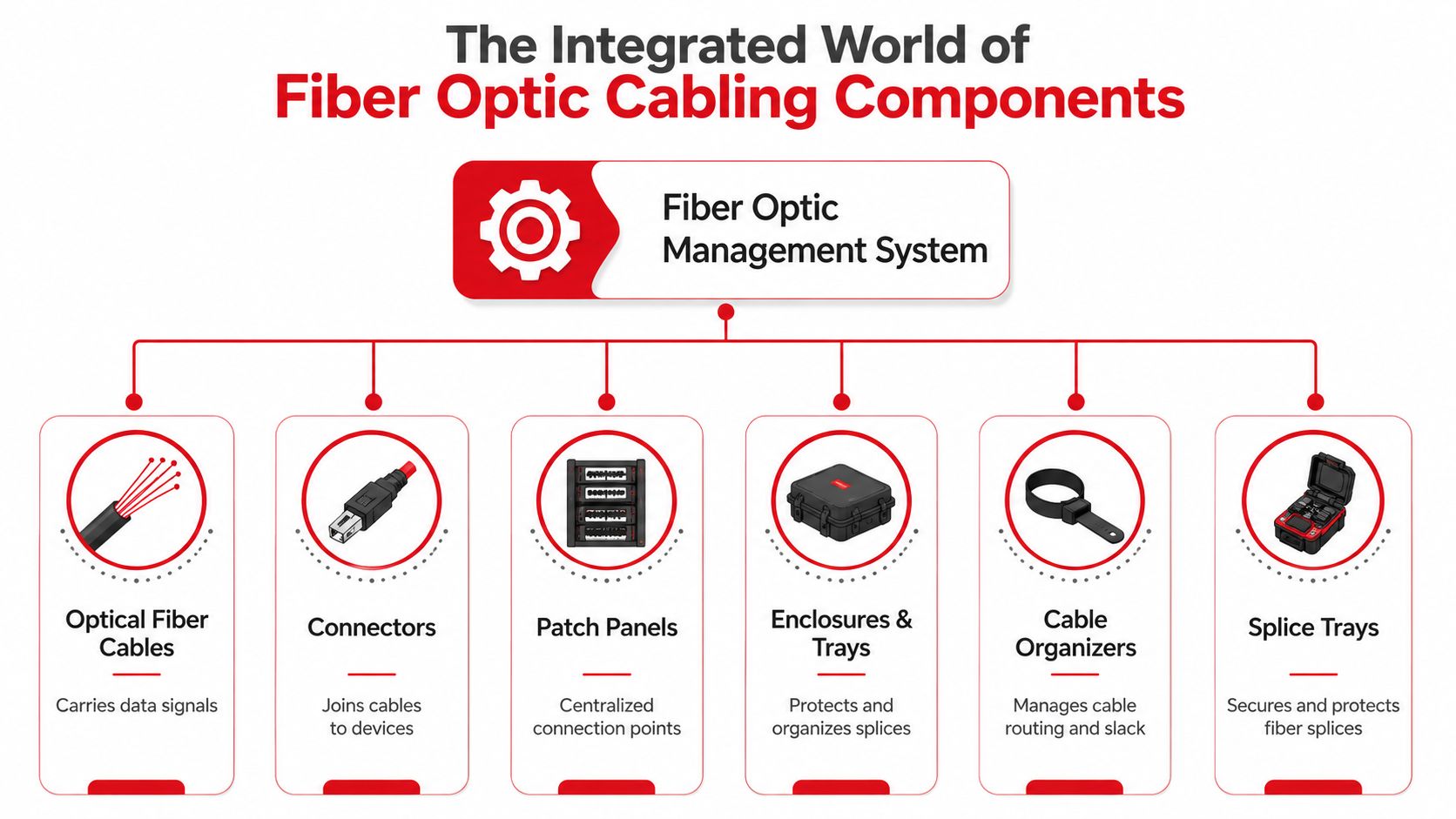
At the top of the system are the pathways. In a data center, that may be overhead raceway, ladder rack, trough, or dedicated fiber duct. In outside plant facilities, it may be routed through cabinets, vaults, or transition enclosures. These are the highways. They protect the cable path and keep routing predictable.
Then come patch panels and distribution frames. These are your interchanges. They give crews a central place to terminate, patch, test, and reroute without digging through a pile of loose jumpers. A well-built panel layout also separates high-change patching activity from more permanent backbone connections, which reduces accidental disruption.
If you're planning a larger build, this guide to network cabling infrastructures is a good reference point for how structured layouts support scalability across different facility types.
The pieces that prevent trouble later
A lot of problems don't start in the trunk route. They start where installers assume small details don't matter.
- Vertical and horizontal cable managers: These keep routing lanes clean and maintain controlled transitions from pathway to panel.
- Slack spools and storage loops: These provide service slack without forcing coils into corners or behind equipment.
- Splice trays and splice enclosures: These protect fusion splices and keep fiber count, routing, and identification organized.
- Radius guides: These control cable path geometry at turns and entries.
- Connector fields and adapter panels: These create repeatable, testable, replaceable connection points.
If one of those is missing, crews improvise. Improvisation is where neat installations become fragile ones.
A patch panel doesn't solve disorder by itself. It only helps if routing into and out of the panel is controlled.
What works in practice
The best systems are boring to look at. That's a compliment. Cables enter from expected directions, labels are readable, slack is stored where it belongs, and every panel position tells a clear story. Technicians shouldn't have to guess which route a jumper took or whether a service loop is safe to disturb.
That same mindset shows up in other regulated environments too. Teams dealing with healthcare or mixed compliance requirements can borrow process discipline from HIPAA-compliant IT asset management advice, especially around inventory control, change tracking, and documentation hygiene.
A good structured cabling system does three things at once. It protects the fiber. It speeds up maintenance. It gives the next crew a clean starting point instead of a hidden liability.
Key Design Principles and Industry Standards
The physical rules of fiber aren't suggestions. If the design ignores them, the network may still pass traffic at turn-up, but it won't stay healthy under maintenance, moves, or growth. Good fiber optic cable management starts with geometry, loading, and identification.
Bend radius isn't negotiable
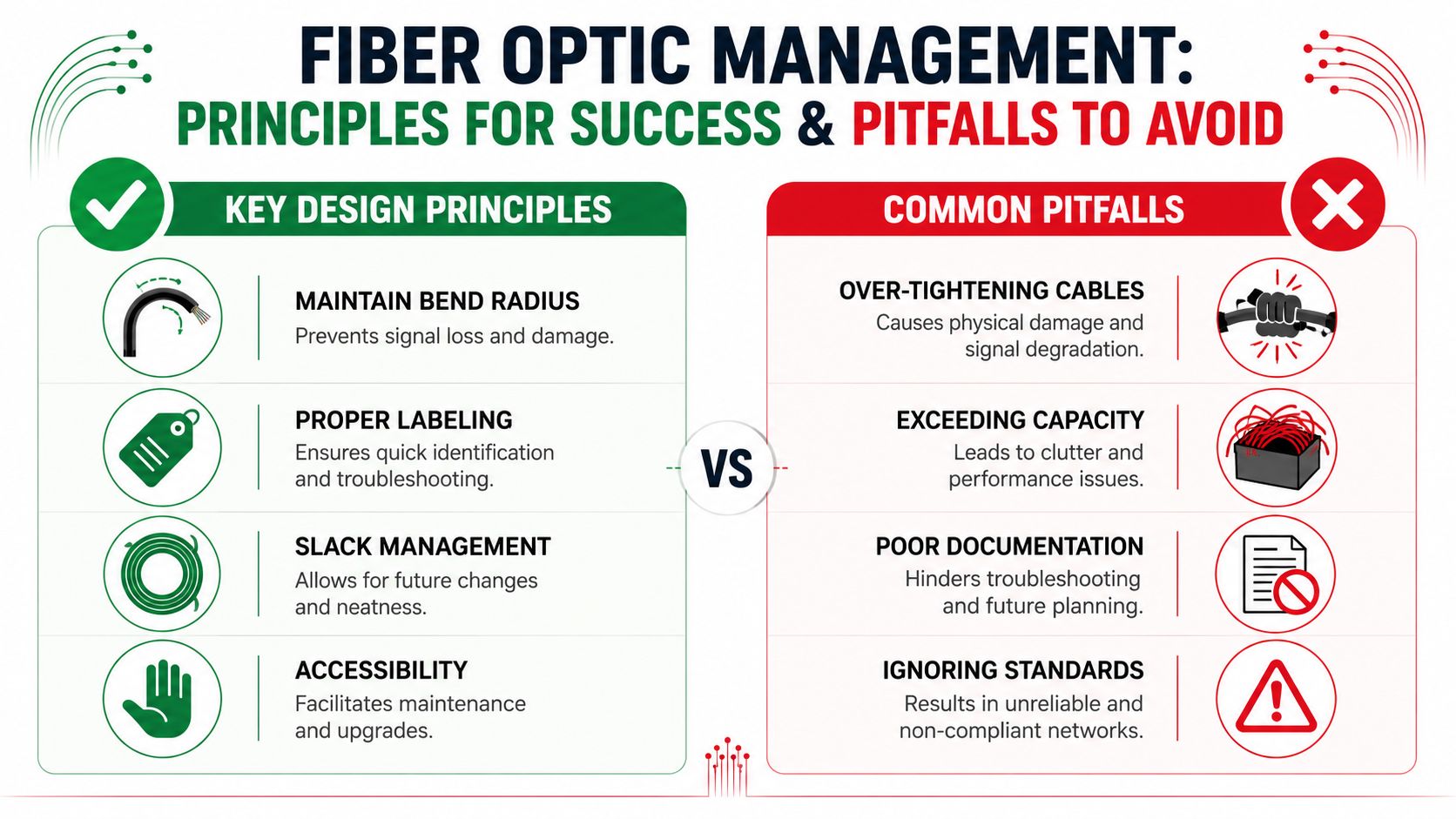
Industry standards mandate a minimum bend radius of 10 times the cable's outside diameter and a pathway fill ratio between 40% and 50% to protect performance and airflow, while up to 80% of cable-related issues are preventable through proper capacity forecasting and pathway design according to data center fiber management guidance.
That rule exists because the glass doesn't forgive abuse. Tight bends create attenuation and can cause permanent damage. In the field, the dangerous spots are usually cabinet entries, vertical drops, tray transitions, and slack storage areas where someone forced a loop tighter than it should be.
The practical question isn't "Can we make it fit?" It's "Can we make it fit without stress now and after three future changes?"
Fill ratio drives both access and cooling
Teams often overfocus on getting today's count installed and underfocus on what the pathway needs to do later. Pathway fill matters for two reasons. First, overfilled routes make additions and removals risky. Second, in facility environments, congested pathways interfere with airflow and service access.
A pathway that looks efficient on day one can become a maintenance trap by the next upgrade cycle.
| Design area | What good looks like | What usually goes wrong |
|---|---|---|
| Pathway loading | Space for growth and service access | Cable packed to immediate capacity |
| Routing transitions | Controlled turns with guides | Sharp edges and improvised turns |
| Equipment access | One circuit can be serviced cleanly | Adjacent fibers get disturbed during work |
Standards matter because people change
TIA-942 and TIA-606-C matter for the same reason lockout procedures matter. Crews rotate, vendors change, and nobody remembers a project perfectly a year later. Standardized labeling, documentation, and testing create continuity when the original installer is long gone.
This reference on data center cabling standards aligns well with what project managers need to review before approving layout, labeling scope, and rack-level organization.
Design check: If a technician can't remove equipment, trace a route, or identify a strand without moving live fibers, the design is incomplete.
A compliant design isn't automatically a maintainable one, but a maintainable design is almost always grounded in standards. That's why the drawing set, labeling plan, and pathway strategy deserve as much scrutiny as the cable count.
A Phased Workflow for Planning and Installation
The cleanest fiber projects don't happen because a crew is careful on install day. They happen because the work is sequenced correctly from planning through closeout. When teams skip a phase or compress it too hard, the physical layer starts collecting hidden problems.
Phase one is design, not drafting
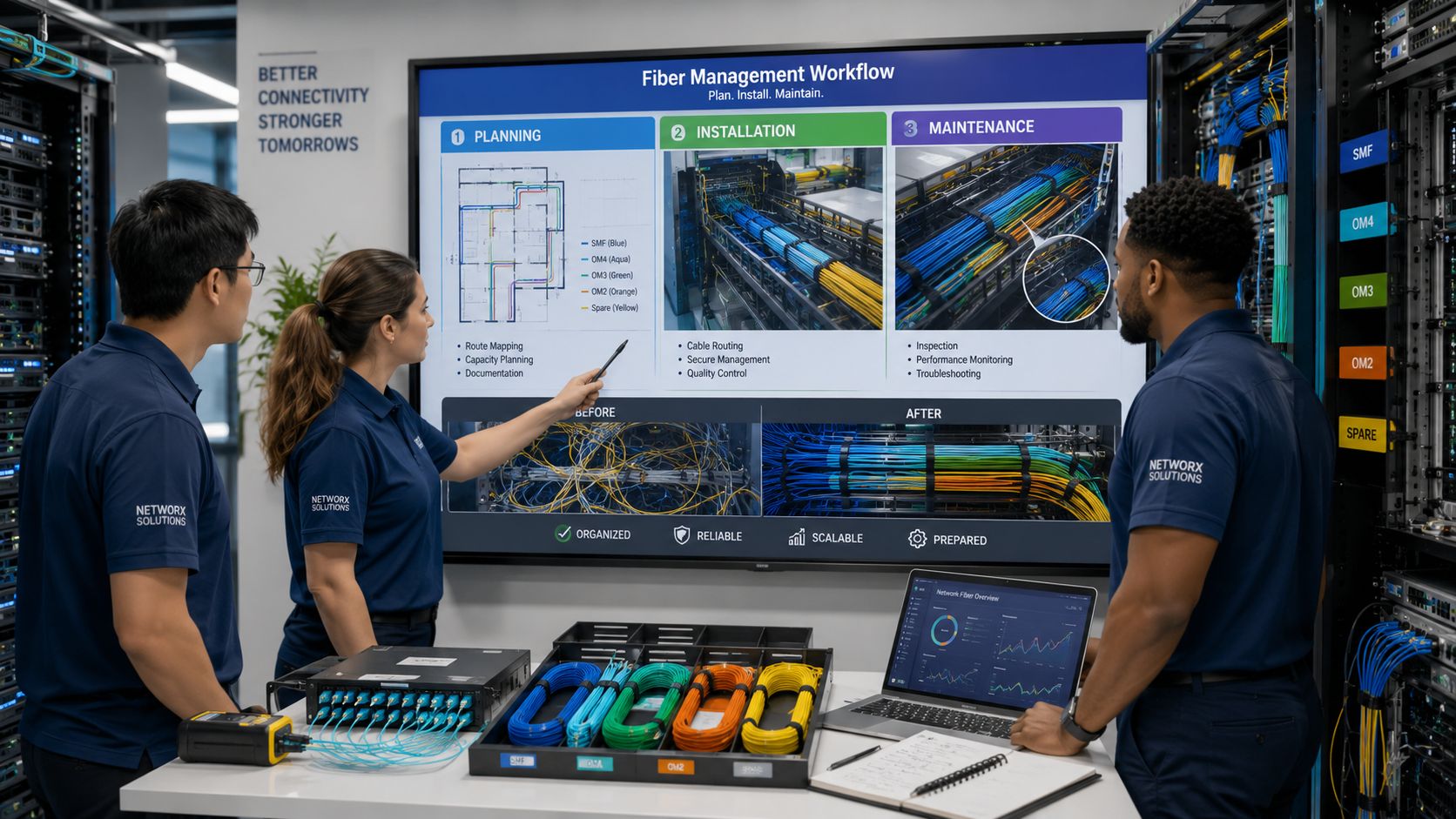
Before any material shows up on site, the route needs to be buildable and maintainable. That means looking beyond the shortest path. You need to know where the fiber enters, where it transitions, where it terminates, and where technicians will need service access later.
A workable planning package usually includes:
- Route mapping: Identify entry points, rack elevations, cabinet paths, splice locations, and transitions between environments.
- Capacity forecasting: Size managers, trays, and enclosures for growth, not just current strand count.
- Hardware selection: Match patch panels, splice trays, slack storage, and pathway hardware to the density and service model.
- Labeling logic: Decide naming conventions before installation starts.
- Documentation expectations: Define what counts as complete as-built information.
If you're coordinating construction with internal stakeholders, this walkthrough on how to install fiber optic cable helps frame what should be locked down before field execution begins.
Phase two is where shortcuts show up
Installation quality usually comes down to handling discipline. Pulling tension, routing path, turn geometry, and fastening method all matter. A crew can use excellent materials and still create a weak plant if they force cable through transitions or improvise support points.
What works on live projects:
- Pre-stage route hardware: Managers, trays, radius guides, and panels should be in place before cable pull.
- Control the path: Use designated supports and keep cable out of pinch points and sharp cabinet edges.
- Leave serviceable slack: Store it where a technician can use it later, not wherever it disappears fastest.
- Build for the next technician: If a jumper crosses active work zones or blocks access, reroute it now.
When staffing is a challenge, project managers often need outside help vetting local contractors. A practical starting point is this guide on finding fiber optic providers, which can help teams compare options and ask sharper qualification questions.
Phase three is testing and records
Testing proves the cable works. Documentation proves the network can be managed.
OTDR traces, end-to-end test results, strand identification, panel schedules, splice records, and as-built route updates need to agree with one another. If those records are incomplete, the project isn't done. It's just energized.
A short visual refresher can help align crews and managers on the sequence from planning to closeout:
"If the as-built package can't guide a night-shift tech during an outage, it's not finished documentation."
The handoff standard should be simple. Another competent team should be able to maintain the network without calling the original installer for tribal knowledge.
Common Management Mistakes and Their Consequences
Most cable management failures don't come from lack of knowledge. They come from crews and managers deciding that one shortcut won't matter. Then the next shortcut gets layered on top of it.
The most common example is bundling fiber with zip ties because they're easy to grab and quick to tighten. That shortcut causes real damage. Improper bundling with zip ties creates localized stress points that cause microbending and signal attenuation, and best practice calls for hook-and-loop fasteners because sharp corners and excessive pulling are tied to higher failure rates in dense installations according to Wave2Wave fiber management best practices.
What teams do wrong
The mistakes are familiar:
- Over-tight bundling: The cable looks tidy, but the fiber is under localized stress.
- Slack stuffed into dead space: Service loops become tangles behind panels, in cabinet corners, or under trays.
- Labels applied late or not at all: Installers assume they'll circle back. They usually don't.
- Pathways used past practical capacity: Adds become force-fit work instead of planned work.
Each mistake creates a second-order problem. A tight tie becomes unexplained loss. Bad slack storage blocks access. Missing labels slow every move and outage response. Crowded managers push technicians to disturb unrelated live fibers.
What the professional alternative looks like
The fix isn't complicated, but it does require discipline.
| Shortcut | What happens later | Better practice |
|---|---|---|
| Zip ties on fiber bundles | Stress, attenuation, brittle handling | Hook-and-loop fasteners with controlled tension |
| Loose slack stuffed behind gear | Hard maintenance and accidental disturbance | Dedicated slack storage and defined routing |
| Handwritten or inconsistent labels | Slow tracing and wrong-circuit risk | Standardized machine-readable labels |
| Last-minute routing decisions | Obstructed access and messy cutovers | Preplanned pathways and panel assignments |
The real consequence is cumulative
One bad tie or one missing label may not trigger an outage today. The problem is accumulation. By the time another team inherits the network, dozens of small compromises have turned a serviceable plant into a fragile one.
Crew rule: If a shortcut saves five minutes now but adds risk to every future touch, it isn't saving time.
That is why experienced teams are stubborn about small details. In fiber work, small details are usually where the long-term failures start.
Management Strategies in Action for Different Networks
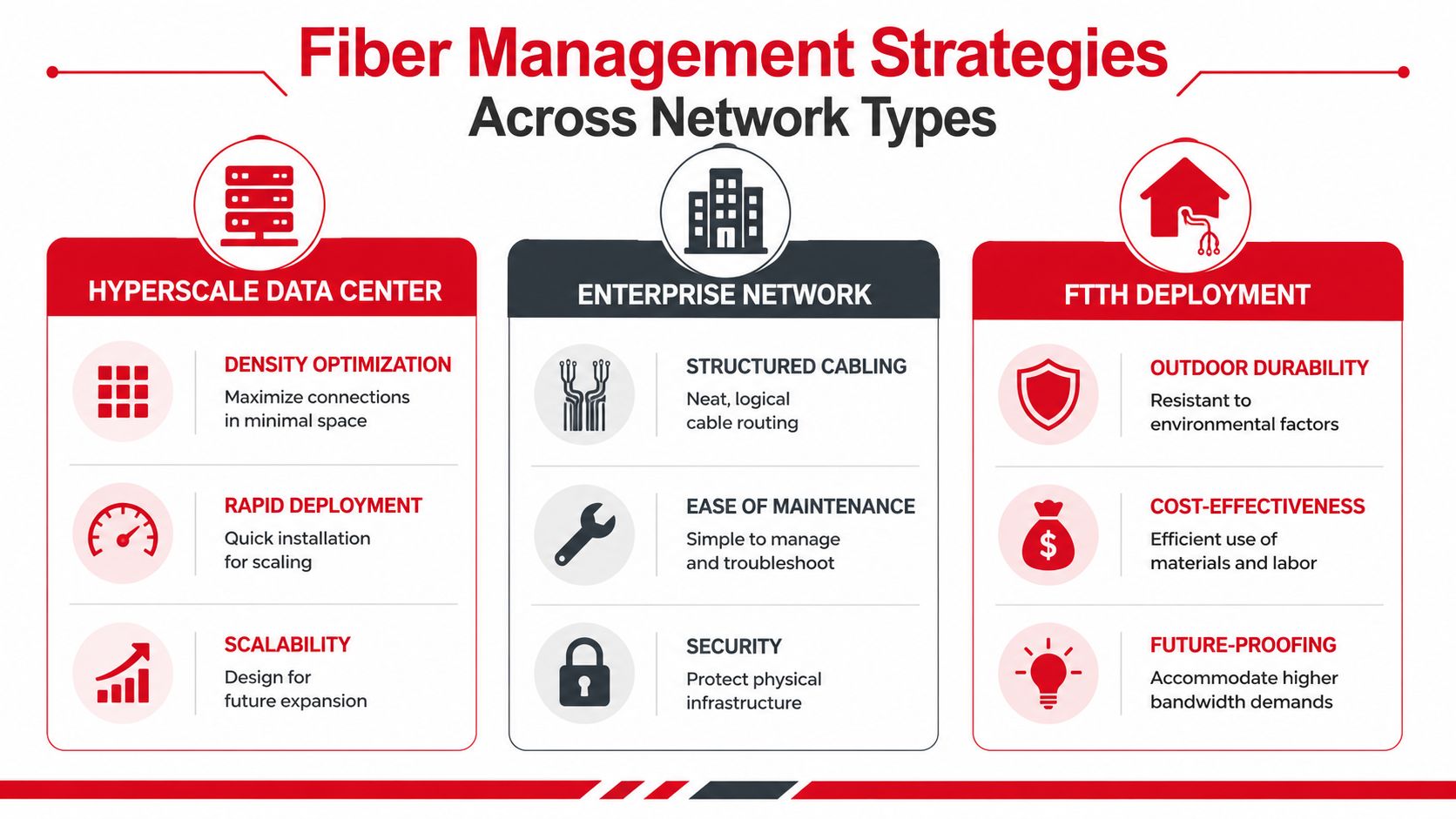
The principles stay the same across environments, but the operating pressures change. A hyperscale room, a carrier route, and a municipal build all need disciplined fiber optic cable management. They just fail in different ways when the discipline isn't there.
Hyperscale data center
In a high-density data hall, the biggest enemy is congestion. The pressure to turn up racks fast can push teams toward tight routing, overloaded managers, and patch fields that are technically complete but difficult to service. The better approach is to separate backbone and patching activity, preserve front and rear access, and treat slack storage as part of the rack design instead of an afterthought.
When that discipline is in place, adds and changes stay localized. Technicians can patch, test, or replace hardware without turning adjacent live connections into a risk area.
Carrier and long-haul outside plant
Carrier environments put more stress on enclosure design and splice organization. The challenge isn't just signal continuity. It's surviving repeated field access, weather exposure, and maintenance by different crews over time. In these builds, the quality of splice tray layout, cable entry sealing, and route identification matters as much as the original splice loss.
A clean enclosure gives a field tech confidence. A messy one causes hesitation, and hesitation stretches restoration time.
Municipal and rural broadband networks
Municipal systems often struggle less with the initial install than with record drift after handoff. That's a serious issue in decentralized networks. In rural and municipal fiber deployments, non-standardized installations can lead to 60% to 70% documentation drift within a year, and a 2025 study found that 44% of outage response delays stem from inaccurate slack-loop and as-built records according to Remee's rural connectivity article.
That shows up in practical ways:
- A handhole gets revisited: The slack loop present in the field doesn't match the map.
- A pedestal is replaced: Strand identification varies from original records.
- An outage occurs after a road project: Crews lose time confirming which route and splice point are in service.
Good municipal fiber records need to reflect the network as it was built, not the network that was intended on the original print set.
For municipalities and co-ops, that means closing the gap between planned drawings and field reality quickly. If they don't, every maintenance task becomes partly an archaeology project.
Building Future-Ready Network Infrastructure
Fiber optic cable management is one of those disciplines that only looks optional when everything is working. Once the network is under load, expanding, or in trouble, it becomes obvious which projects were built for long-term operation and which were only built to pass initial testing.
The pattern is straightforward. Use the right physical components. Design to standards instead of to minimum effort. Install with route control, slack discipline, and labeling from the start. Then finish the job with testing and as-built documentation that another crew can trust. That is what protects total cost of ownership over the life of the network.
Project managers usually don't need more reminders that time and budget matter. They need a clear view of where shortcuts create recurring cost. In fiber, those costs show up as harder cutovers, slower restorations, higher change risk, and expensive remediation in spaces that should have stayed orderly from day one.
A future-ready network isn't just high-capacity. It's maintainable. Teams can touch it, expand it, and troubleshoot it without fear of causing the next outage.
If you're planning a broadband build, data center fit-out, carrier expansion, or remediation project, Southern Tier Resources can help you design, build, and document fiber infrastructure that stays reliable long after turn-up. Their team supports the full project lifecycle, from engineering and construction through splicing, testing, and as-built delivery, so you don't have to trade speed today for maintenance problems later.