You're staring at a project that's already bigger than the router closet. Maybe the service order is approved, the conduit route is half-marked, and someone still thinks “going live” means plugging in a few boxes and making sure the Wi-Fi name looks right. That's not how how to connect a network works when the build has to survive permits, construction, testing, and handoff.
In the field, the network only becomes real when crews, engineers, and operations staff each finish their part without stepping on the next team's work. That's true whether you're building a fiber route for an ISP, outfitting a data hall, or extending coverage with wireless on top of an existing backbone. The job starts long before light ever passes through glass.
Starting with the Job You Are Actually Building
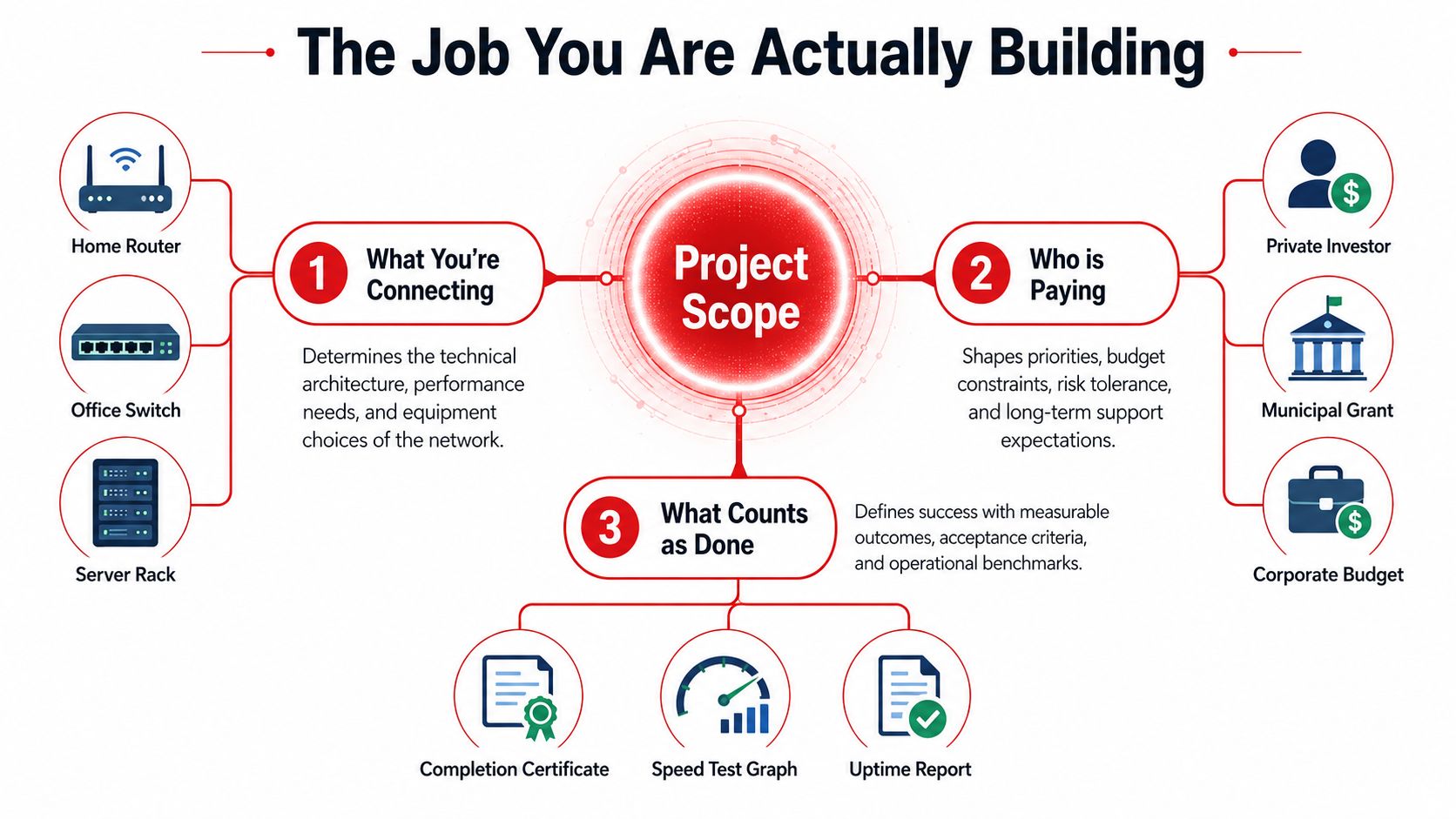
A good network build starts with a blunt question: what are you connecting? A greenfield fiber route for an ISP, a hyperscale data center fit-out, and a wireless overlay on towers all need different drawings, different crews, and different acceptance standards. The mistake I see most often is treating those as variations of the same task instead of separate project types with different finish lines.
Scope drives every downstream choice
If the deliverable is lit service, the team needs transport, power, testing, and turn-up plan aligned from the beginning. If the deliverable is dark fiber, the emphasis shifts to route integrity, splice quality, documentation, and handoff records that future operators can trust. That difference sounds small in a kickoff meeting, but it changes materials, labor sequencing, and the way the customer signs off on completion.
The practical scoping questions are straightforward:
- What area is being served? A single building, a campus, a neighborhood, or a multi-site footprint all imply different architectures.
- Who owns the budget? Private capital, municipal funding, or corporate expansion teams each bring different review cycles and approval gates.
- What counts as done? A completed construction package, a live service test, or an uptime-ready handoff are not the same deliverable.
The history of networking matters here because modern builds still rest on the logic that emerged with ARPANET in 1969, the first large-scale, general-purpose computer network, later extended through TCP/IP into the Internet as we know it today. That legacy is why today's projects still depend on packet-based communication, standardized protocols, and separate endpoints instead of point-to-point circuits, even when the media changes from copper to fiber to wireless. A brief history of network technology
Practical rule: define the finish line before the first crew mobilizes. If the team can't say what “done” means in one sentence, the project will drift.
For campus deployments, design partners can help translate those scope decisions into a buildable layout, and Cisco Meraki WiFi for campuses is one example of how wireless planning gets tied to the larger network design conversation. The point is not the brand, it's the discipline of matching architecture to the actual job. For a broader planning view, the internal guide on fiber optic network design fits into the same scoping mindset.
Planning the Design and Permitting Path
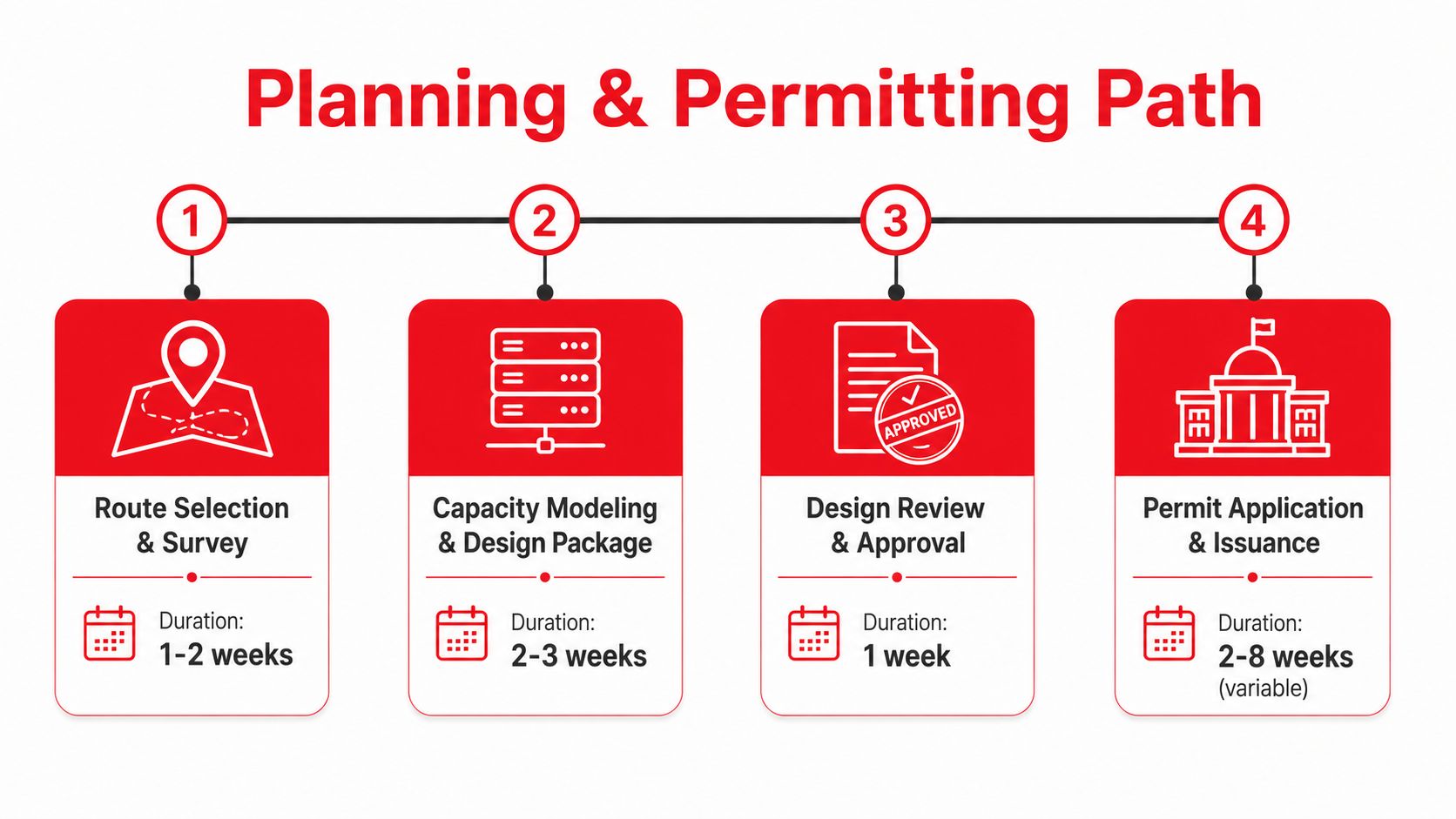
The design package has to survive review before it survives construction. That means route selection, capacity modeling, and permit-ready drawings need to be coordinated as one package, not passed around as separate scraps of intent. A route that looks efficient on a map can fail if pole access, right-of-way, or local approval rules aren't solved early.
Pick the architecture that will stay online
In underserved or remote areas, the best answer is often hybrid. Use fiber where it's economically feasible, microwave or wireless for branch distribution, and satellite only as a fallback when the other paths can't be made reliable. Power stability, maintenance access, and utility corridors often decide whether a network stays up more than raw bandwidth does.
That trade-off is why route engineering has to be practical, not aspirational. A beautiful single-technology design can become fragile if it depends on a hard-to-permit corridor or a site that local crews can't reach quickly after weather or power issues. A resilient plan accepts that different links solve different problems.
Get the paperwork lined up before construction window opens
A permit-ready package usually includes construction drawings, pole-loading analysis, right-of-way agreements, and municipal or state notifications. Those documents matter because the field crew can't safely or legally improvise around missing approvals once the project is in motion. In community and municipal work, licensing also has to be proportionate, simple, and fast, because approval timelines of 30 to 45 days are the kind of delay that can slow or block a smaller deployment even when the technology itself is straightforward. Licensing approaches for community-centered connectivity
Reviewers don't care how elegant the network is if the route package can't be approved. The design has to be buildable on paper before it's buildable in the street.
For planning discipline, a project team should sequence engineering deliverables so permitting doesn't become the bottleneck. The practical order is survey first, capacity and route design second, approval package third, then permit issuance and mobilization. That same sequencing is what keeps change orders from exploding later, because the route is already grounded in the constraints that matter.
The moment a site is selected, someone also needs to know whether the build will support future maintenance and expansion. That's where a conservative design pays off, because the network usually outlives the first customer it serves.
Running Make-Ready and Civil Construction
Make-ready is where overhead and underground projects either move cleanly or stall for weeks. On aerial builds, the pole route has to be surveyed, attachments reviewed, and space cleared before strand or lash ever goes up. On underground builds, the bore path, trench line, and conduit plan have to be set before anyone starts opening ground.
The site has to be ready for the crew, not just the drawing
Pole work begins with attachment permitting and a realistic look at the existing structure. If the pole can't safely accept the new load or there's no clear attachment path, the crew loses time waiting for a redesign. Underground work is just as unforgiving, because a wrong conduit size or poorly placed handhole can make the next phase harder than it needs to be.
Inside the building, the same logic applies to core holes and pathways. Ladder rack, sleeves, and route clearance all need to be in place before structured cabling shows up, or the inside plant gets slowed down by trades stepping on each other. The best crews treat pathway prep as a separate deliverable, not a side task.
Safety is a construction requirement, not a slogan
The field routine should be visible every day. That means traffic control plans where lanes are affected, confined-space permits where they're required, locator tickets before any excavation, and daily Job Hazard Analyses before the first tool comes out. None of that is paperwork theater. It's the difference between a build that keeps moving and one that gets shut down after a preventable incident.
A realistic week-one site usually looks more like staged readiness than visible progress. One crew is confirming utility locates, another is setting up traffic control, and the civil team is making sure the route is clear before the actual work starts. If the site is sloppy at that stage, the splice crew inherits the mess later.
The internal guide on heavy civil construction fits here because the civil phase decides whether the rest of the project can be done cleanly. In practice, the milestone that matters is simple, the route is stable, safe, and physically ready for installation.
Splicing, Terminating, and Certifying the Fiber
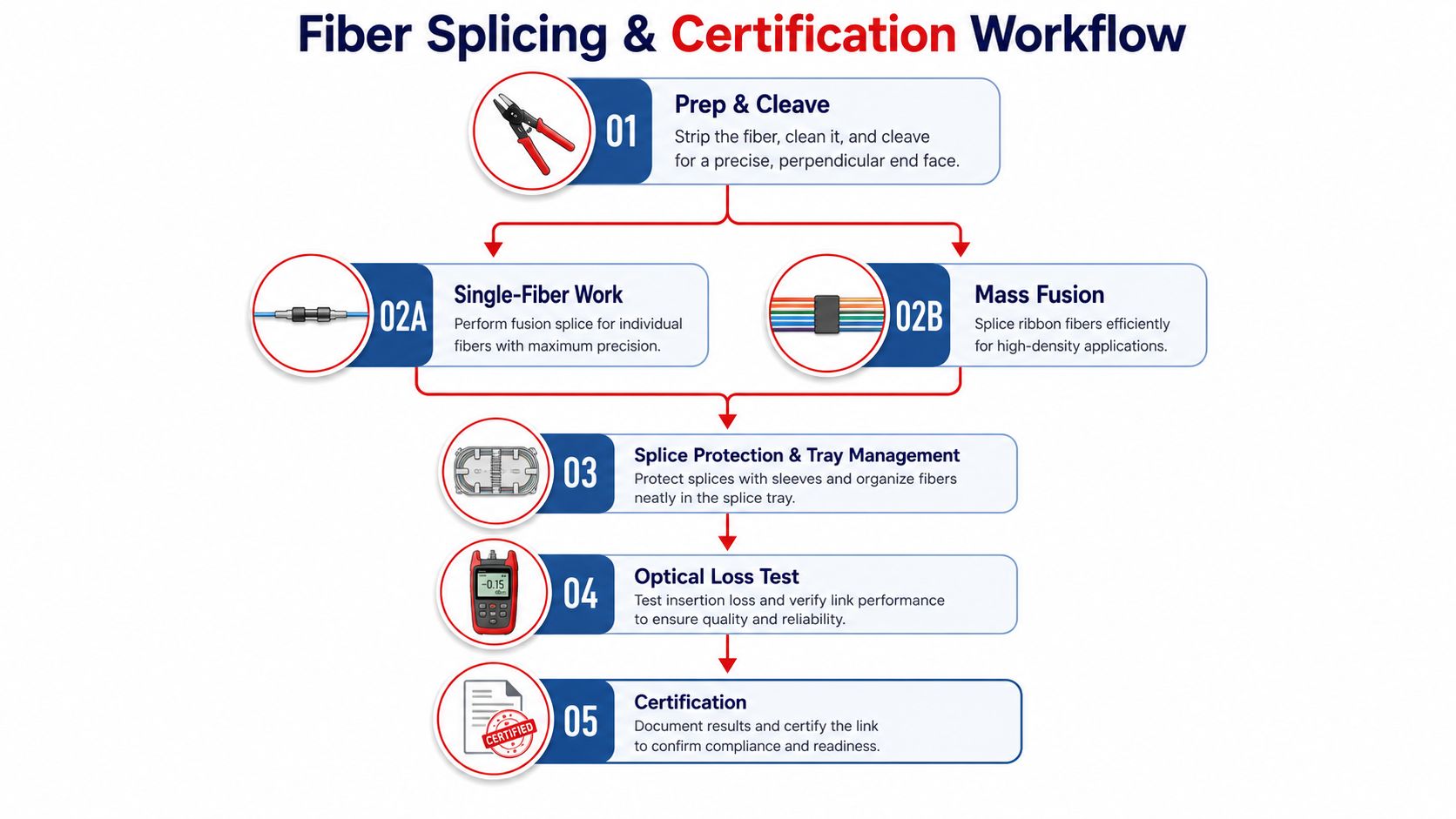
The project transitions from concept to network at this stage. Fiber work rewards attention to detail and punishes shortcuts immediately. A clean splice, a good cleave, and disciplined tray management save hours later when the line has to be tested or repaired.
The craft starts before the splicer is powered on
Fusion splicing only works well when prep is disciplined. Crews strip, clean, cleave, and inspect before they commit to the splice, because contamination or a bad end face will show up in the loss result and usually in the customer complaint later. Single-fiber work and mass fusion both have their place, and the right choice depends on the cable type, ribbon count, and the density of the build.
Once the splice is made, protection and tray management matter just as much as the optical work itself. A tidy tray makes the as-built useful, keeps bends under control, and makes future troubleshooting faster. Labeled, organized trays also reduce the kind of confusion that turns a simple fix into a half-day hunt.
Test the physical run before you chase service issues
The validation pattern that works is staged. First, certify each physical run with a tester after termination, then confirm end-to-end access to shared services and the internet. That order matters because poor termination or mislabeled runs are among the most common reasons post-install failures show up after the build team leaves.
Fiber certification isn't just about getting a pass on the report. It's about understanding what the trace says, where a bend or bad splice may be hiding, and whether the route behaves like the drawing said it should. That's why the team records every splice in the connector map and ties it back to the as-built before handoff.
A clean test result that can't be traced back to a labeled path isn't a real result. It's just a number with no operational value.
For teams that want a practical testing workflow, the internal resource on how to test fiber optic cable belongs in the project file alongside the splice records. The embedded walkthrough below is useful for showing the field sequence in a compact way.
Building Out the Data Center and Structured Cabling
Once the long-haul fiber lands in the building, the project shifts from outside plant to inside plant. The rules change fast. In a data center, layout discipline, labeling, and pathway control matter as much as the cable itself because future moves, adds, and changes are constant.
Rack layout and airflow shape the build
Cabinet placement isn't just about fitting equipment into a room. It has to support hot and cold aisle strategy, keep maintenance access clear, and work with the facility's power and cooling design. If the racks are crowded or the pathways are improvised, the whole room becomes harder to operate, not just harder to cable.
The main distribution area and intermediate distribution frames create the backbone of the room's cabling structure. That structure is what lets backbone cabling and horizontal cabling stay organized instead of turning into a patch cord tangle six months later. Patch panel labeling and color discipline also save time during every move, because technicians don't have to guess which path goes where.
Match media to the job, not to habit
| Media | Typical Reach | Bandwidth | Best Use Case |
|---|---|---|---|
| Copper twisted pair | Shorter inside-plant runs | Suitable for many access links | Workstations, access switches, short patching |
| Fiber optic cable | Longer backbone paths | High-capacity transport | Core links, inter-rack connections, uplinks |
Ethernet became the dominant LAN standard in the 1970s, and IEEE 802.3 now defines the media and protocol standards that keep copper and fiber links interoperable across devices. The wireless side came later, with the original Wi-Fi standard in 1997 under the IEEE 802.11 working group, which is why inside buildings today often combine structured cabling with wireless access layers rather than trying to make one medium do everything. Computer network background
The right inside-plant choice depends on reach, service expectations, and how often the space will be reworked. Copper still has a place where short runs and simpler termination are the priority. Fiber wins when backbone capacity, physical separation, or future growth are the primary concern.
Adding the Wireless Layer On Top
Wireless doesn't replace the backbone, it depends on it. Small cells on street furniture, distributed antenna systems inside buildings, and macro tower upgrades all need transport back into the same network that serves other customers. The radio may be the visible part, but the network underneath is what decides whether the experience holds up.
Backhaul is the real integration point
A cell site is only as useful as its backhaul. That backhaul lands on transport that has to be designed, powered, and maintained like any other critical network segment. On tower work, power and grounding deserve the same attention as antenna height because a site that can't stay stable won't stay useful for long.
Neutral hosts and tower companies often enter the picture here, especially when multiple carriers need shared infrastructure. That creates a coordination problem, not just a construction task. Everyone wants coverage and capacity, but the site has to be physically sound, safely accessible, and documented so future upgrades don't start from scratch.
Coverage, capacity, and safety pull in different directions
Wireless upgrades always trade something. More coverage can mean a different antenna arrangement. More capacity can mean more site work or a different transport design. The right answer depends on where the bottleneck is, and crews need to know that before they start bolting hardware to a structure.
Safety isn't optional on wireless work. Climbing risk, RF exposure, and weather all make tower jobs different from inside-plant construction. The field team has to respect those conditions at every step, because the consequences of a bad day on a tower are much higher than a bad day at a patch panel.
Commissioning, Documentation, and Handoff to Operations
The last ten percent of the project decides whether the first nine tenths mattered. Commissioning is where the design gets proven against the build, and handoff is where operations receives a network it can reliably maintain. If the documentation is thin, the install may still be physically complete, but it won't be operationally ready.
Acceptance testing has to match the design package
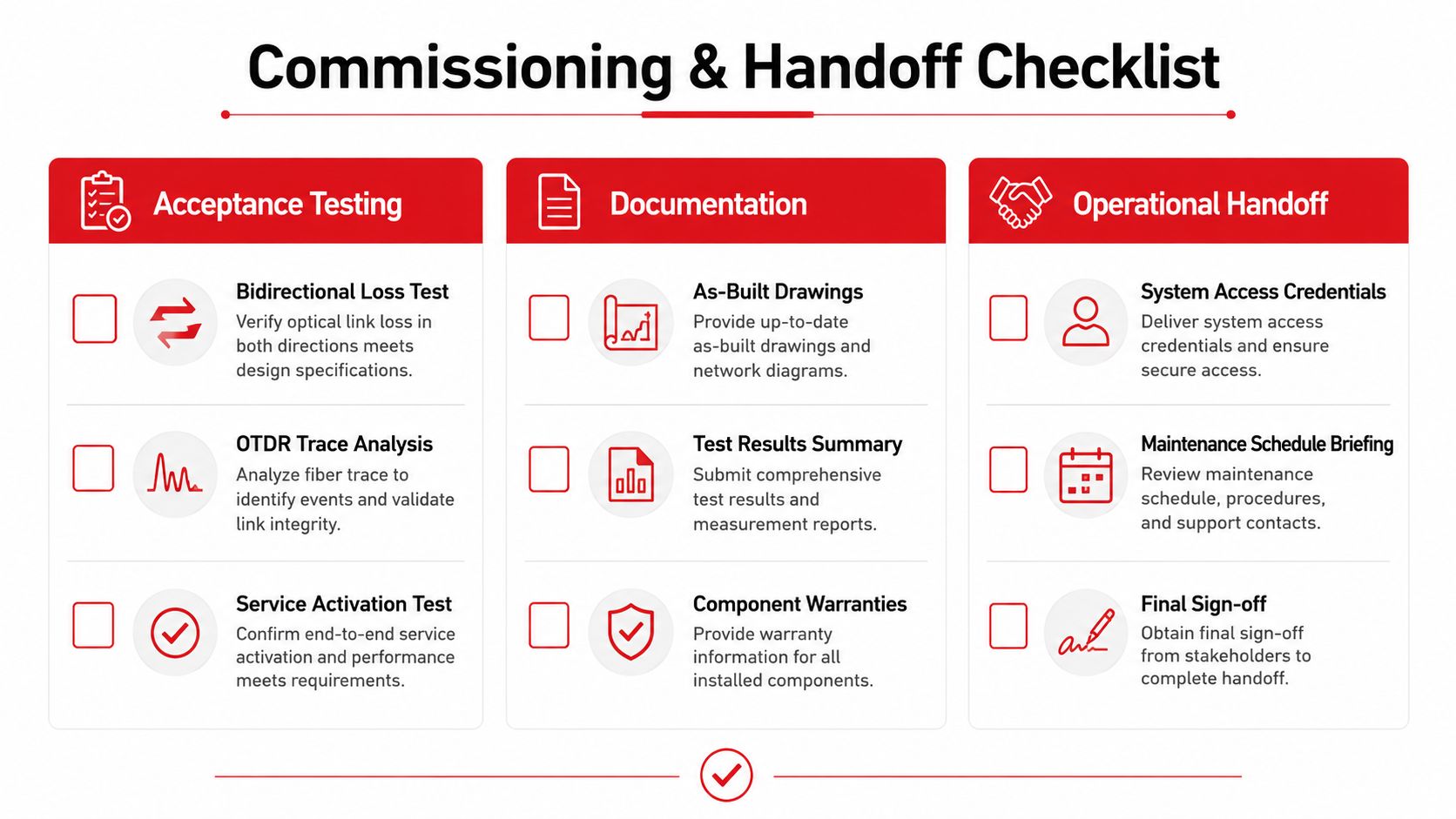
The checklist should cover power, grounding, optical loss budgets, and end-to-end service turn-up. Those tests are the proof that the installed path behaves like the approved design, not just like a cable that happens to be lighted. A project manager who skips this stage usually pays for it later in avoidable truck rolls and slower troubleshooting.
A good handoff package includes as-built drawings, test results, splice diagrams, asset records, and a written note of any deviations from the original design. Those documents matter because crews on day ninety are rarely the same people who were on site on day one. The more clearly the work is recorded, the less time operations loses reconstructing what was installed.
For ongoing visibility, teams also need a clean monitoring stack. A practical network device monitoring guide is useful when operations wants to connect physical infrastructure to real-world alerts instead of waiting for a user complaint.
What a strong handoff actually gives operations
A solid handoff shortens the time needed to find faults, verify assets, and respond to outages because the records are already organized. It also gives the operations team enough context to mobilize quickly when something changes. That's the quiet value of a complete project closeout, it keeps the network supportable long after the construction crew is gone.
- Acceptance Testing: confirm bidirectional loss, OTDR traces, and service activation.
- Documentation: deliver as-builts, test summaries, and component records.
- Operational Handoff: transfer access, maintenance cadence, and final sign-off.
Southern Tier Resources builds and supports network infrastructure across fiber, wireless, data center, and civil scopes, so if you need a team that can take a project from design, make-ready, and splicing through documentation and handoff, visit Southern Tier Resources and review how their crews fit into your next build.