At 2 a.m., the outage ticket looks simple. A fiber route is down, the on-call engineer opens the as-built, and the splice point on paper doesn't match the handhole in the field. That's when documentation stops being admin clutter and becomes the only thing standing between a quick fix and a long night.
Good documentation best practices aren't about filing paperwork for a manager. They're about making sure the people on the hook for restoration, testing, maintenance, and handoff can trust what they're reading when the clock is running and the truck is already rolling. In infrastructure work, the repository is part of the operating system.
The Night the As-Built Was Wrong
The worst part of a bad as-built isn't that it looks messy. It's that it looks plausible enough to send a crew in the wrong direction. I've watched teams lose hours because the drawing showed one splice location, the field showed another, and nobody could prove which record had the last real update.
That's the core problem with weak documentation. It doesn't fail loudly, it fails at the exact moment somebody needs it to be right. The result is extra troubleshooting, extra site visits, and a lot of confidence lost with customers who expected the fix to be routine.
Practical rule: if a field technician can't use the document to make the next physical decision, it isn't operating documentation yet.
The older standards got this right early. Statistical guidance defines documentation as the recording of activities, concepts, methods, and process details, and it explicitly requires agencies to document the whole activity, adopt a metadata strategy, cite sources, update regularly, and edit thoroughly before publication. The U.S. Office of Management and Budget's proposed survey standards go further, saying the documentation has to be sufficient to understand proper analysis and to replicate and evaluate results, which makes documentation a reproducibility requirement, not a side task. The same source also emphasizes permanence, versioning, curated records, and retention planning for datasets and estimates, which is exactly the mindset infrastructure teams need for as-builts and turnover records. See the Singapore Statistical Best Practices report for that foundation.
That's why the rest of this guide stays on the floor, not in the conference room. The point is to make documents that survive construction churn, support field reality, and still make sense after the original crew has moved on.
What Infrastructure Documentation Includes
A field crew does not need a neat archive. It needs a document set that tells the truth about what was built, what was tested, what is safe to operate, and what changed after turnover. In practice, infrastructure documentation has four parts that have to stay in sync, and each one fails in a different way when the handoff process slips.
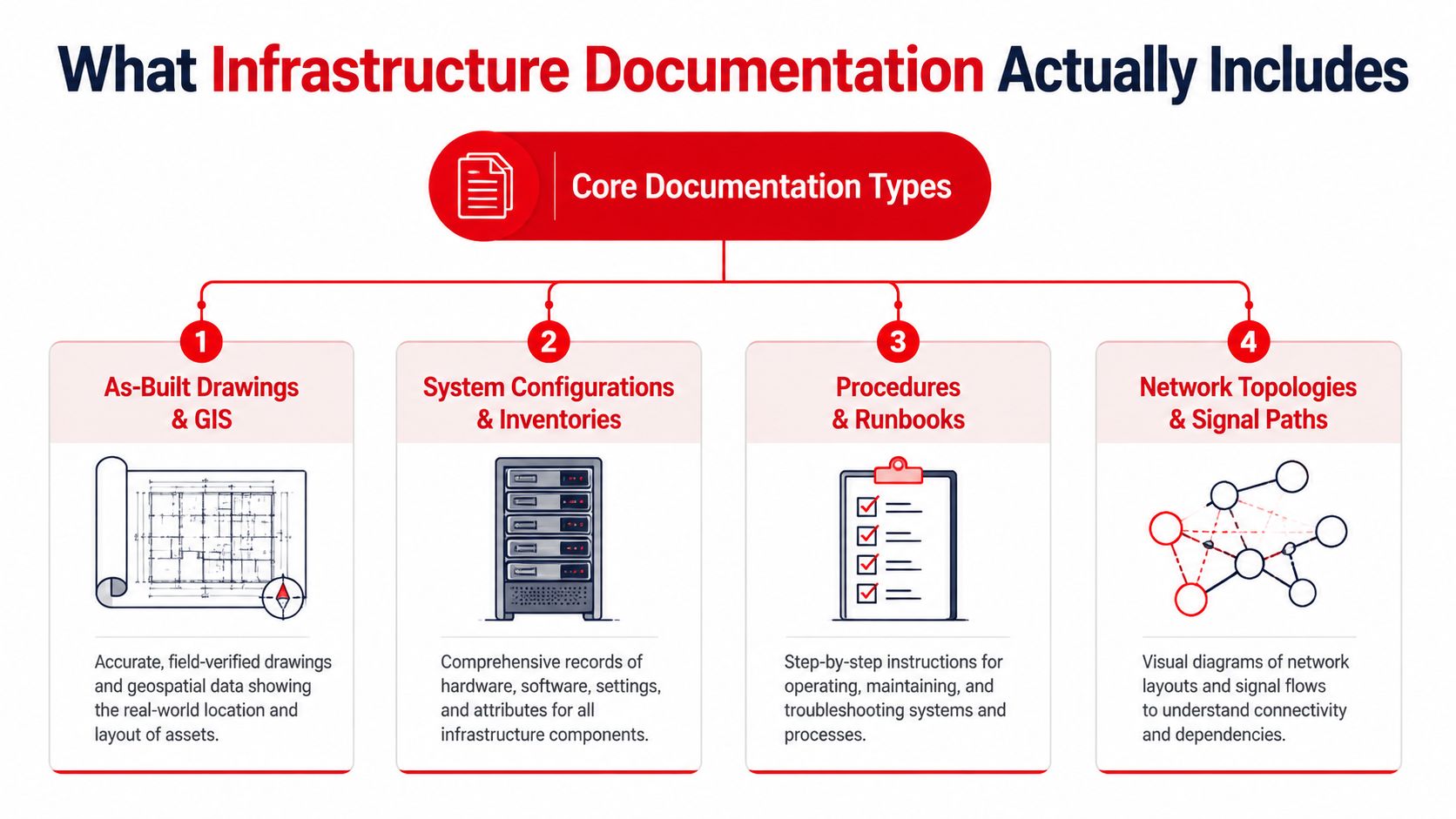
The four categories crews depend on
As-built drawings and GIS records show what was installed, where it landed, and how the physical path changed from design to closeout. If those records lag behind field work, every later task slows down, from fault isolation to future make-ready work. That is why teams need a live synchronization habit, not a once-a-project cleanup, especially on fiber routes, wireless sites, and data center fit-outs where the physical layout keeps changing during closeout. For a useful field example, see this data center cabling standards reference, which shows how much downstream work depends on clean records.
Test and commissioning reports prove the system was accepted as intended. For fiber, that means a clear line from the work performed to the test results that verified it. For data center fit-outs, it means the owner can tell the difference between installed and proven, which matters when people start troubleshooting under pressure.
Operations and maintenance manuals need to be written for the people who will use them. Brown University's documentation guidance is practical here, keep a notebook, date entries, record protocols, assign an identifier, and build codebooks or README files so others can reproduce and interpret the work. The same discipline makes O&M packs easier to trust. Brown University research data guidance
The same standard applies to turnover packages, even if the work is messy and split across trades. A good O&M set answers the questions a night-shift technician will ask at 2 a.m., not the ones a project team asked during closeout.
Change and incident records are the living memory. Without them, the team loses the story of why something changed, which crew touched it, and what got superseded. That gap turns a clean handoff into a guessing game six months later, and the next outage review becomes an argument over which version is real.
The Constructive-IT lessons learned guide reflects the same practical point from the delivery side. Capture what changed, what failed, and what was learned while the details are still fresh, then tie that record back to the current package so the history does not drift away from the work.
The University of Wisconsin frames the whole practice well. Cite the source, define the data with a dictionary, describe the package with a README or data specification, track lineage, and capture the reproducible environment and workflow. In infrastructure terms, that means the document set needs a source-of-truth pointer, a clear package structure, and enough environment detail to keep maintenance and troubleshooting grounded. University of Wisconsin documentation guidance
A strong repository doesn't just store records. It shows how the records relate to each other.
Naming Conventions and Metadata That Scale
Naming systems fail. At first, every crew can still find the right file. Then one team starts using shorthand, a second team copies it, and a project manager renames folders to make the tree look cleaner. After that, nobody is certain which file is current, and the repository starts drifting away from the work.
A naming convention has to survive turnover, field changes, and handoff pressure. For telecom, wireless, and data center work, the safest pattern is to put the project, site, system, discipline, revision, and status in the filename. That gives anyone opening the folder enough context to sort the file before they read a single line.
What belongs in the name and what belongs in metadata
The filename should stay readable. The metadata carries the durable context. I treat owner, last-verified date, source-of-truth pointer, and retention class as required metadata fields. If an artifact cannot answer who maintains it, when it was last checked, where the authoritative version lives, and how long it must remain available, it is not ready for field use or operations.
That distinction matters because document hygiene advice often stops at “be consistent.” Consistency has to be built around real workflows, not tidy folders. A fiber package may need separate paths for design, field redlines, testing, and handoff. A wireless job may split by site, sector, and commissioning package. A data center fit-out often needs a tighter split between power, connectivity, and structured cabling records, especially when the repository has to reflect the pace of construction rather than the pace of closeout.
For a practical outside view on how teams capture lessons and keep change history useful, the Constructive-IT lessons learned guide reinforces the habit of preserving what changed and why, not just the final artifact.
Internal standards should also spell out what to avoid. Skip names that only make sense to one supervisor. Skip date formats that sort badly. Skip revision status buried in email replies or chat threads, because those comments do not stand up to audit or turnover. If the naming logic takes more than a quick explanation, it is probably too clever for a working repository.
For cabling and fit-out teams, the Southern Tier Resources data center cabling standards provide a useful reference point for how structured records support field work without turning the repository into a maze.
Templates and Example Artifacts
Templates are where documentation turns from tribal knowledge into repeatable work. A good template doesn't just make the page look orderly, it forces the team to capture the fields that matter and stops everyone from improvising a different format on every job.
The mistake I see most often is building templates that look polished but ask for the wrong kind of input. If a crew has to write free text for information that should be structured, you've created friction and invited inconsistency. If the template is too rigid, people will stop using it and send their updates through side channels instead.
A template set that holds up in the field
An as-built template should require geometry, path details, asset identifiers, and clear references to the installed configuration. Optional notes can cover exceptions, but the core record has to be structured enough that another team can use it without calling the original drafter.
A test report template should separate the test method, the acceptance result, and the trace or evidence file. That sounds obvious until someone buries the actual result in a comment field and the acceptance package becomes hard to verify.
A circuit or port assignment template needs structured slots for source, destination, asset, and status. That matters because port assignments tend to change during fit-out and turn into guesswork when they're not versioned cleanly.
A change record template should capture who requested the change, who approved it, what was superseded, and what field work happened. Without that, you end up with a nice-looking change log that doesn't explain the event.
An O&M template has to be bluntly usable. If operations won't open it at 3 a.m., it's not a real O&M document, it's a compliance artifact. Keep procedures short enough to scan, but complete enough to trust.
Good templates reduce decision fatigue. They tell the author what to capture and tell the reader what to expect.
The best part is that templates make version control easier too. Once the shape of the artifact is stable, approvals and field updates become simpler to review, and the team spends less time arguing about format and more time checking whether the content is accurate.
Version Control and Change Management for Documents
Documentation rots when two versions exist and nobody knows which one is current. That's not a theory, it's the default outcome in fast-moving field work if no one owns the repository discipline.
The cleanest approach is to treat documentation like an engineering artifact. Put it under version control, keep one source of truth, and make promotion from draft to released a deliberate step. Google's documentation best practices are very clear on this, documentation kept in the same version-control system as source code can be validated in CI, which reduces drift, preserves review history, and makes “doc tests” possible so broken examples fail before release. Google documentation best practices
The operating model that prevents split-brain docs
First, choose a home for the master record. Git works well when the documentation is text-heavy and tightly tied to engineering change. SharePoint with versioning can work when the organization is already committed to that stack. A purpose-built DCIM or GIS can be the right choice when location, asset state, and topology are central.
Second, define what happens when the field changes. A crew shouldn't have to wonder whether to edit the source doc, send an email, or log a ticket. The path has to be explicit, or the repository will drift the first time the job gets busy.
Third, mark superseded records so they can't be mistaken for current. Archiving isn't enough if old files still look active. The current record should be obvious, and the obsolete one should be hard to confuse for it.
Fourth, use version tags or revision IDs that survive handoff. That makes it easier to tie the repository to the state of the project at the exact moment a crew closed the work.
A short practical reference on migration-style documentation can help here too, especially when the repository itself is being moved or cleaned up. The SharePoint migration runbook examples are useful because they show how to manage document state during transition, which is where many teams lose control of the record.
QA, Review, and Signoff Workflows
A document nobody has reviewed is still a draft, even if it looks complete. The review chain has to catch technical errors, template misses, and accountability gaps before anyone in the field treats the file as current truth.
The cleanest way to keep the process workable is to split review by purpose. Peer review checks technical accuracy. QA review checks completeness against the template. Owner signoff confirms the record belongs to the team that must maintain it. Client or regulator signoff only belongs where the contract requires it, and that evidence needs to stay attached to the artifact.
Who should review what
Peer review should sit closest to the work. The person who understands the construction sequence, test method, or network layout is the one most likely to catch a bad call before it turns into an outage or a rework cycle. Manager signoff helps with accountability, but it does not replace technical review.
QA should act as the gatekeeper for structure, not just content. If required fields are missing, if screenshots are stale, or if the handoff package does not match the template, the document should go back. That slows the handoff in the moment, but it is cheaper than finding the gap during a cutover, an audit, or a night shift when the crew is already under pressure.
If one person wrote it, reviewed it, and signed it, the process probably missed the only check that mattered.
Good workflows keep evidence with the record. A review log, a signoff field, or an approval trail in the repository all work, as long as the proof survives personnel changes and project closeout. That is the point where documentation starts behaving like an engineering artifact instead of a loose file set.
Mixed teams also need clear rules for what automation checks first. Broken links, stale references, and missing required sections should fail loudly before the document reaches a crew. Judgment calls and narrative procedures still need people, but mechanical errors should never get through by accident.
A useful support-oriented perspective on making documentation easier to find and maintain is the tips for support knowledge bases, especially where searchability and upkeep matter more than authoring polish. For infrastructure teams, the same logic applies to runbooks and handoff packs.
For teams trying to keep documentation tied to active delivery, the tech in construction perspective is a useful reminder that the document system has to track field execution, not sit beside it as a separate archive. That gap matters in fiber builds, wireless work, and data center fit-outs, where the repository can drift behind the work unless review and signoff are part of the operating rhythm.
Tooling and Automation That Keep Docs Honest
Manual documentation drifts. Automated documentation nudges. That's the practical split, and it matters because no operations team wants to depend on perfect human memory to keep the record current.
The first things to automate are the checks that catch obvious rot. Link validation, schema validation, and freshness flags all belong in the workflow because they save reviewers from wasting time on mechanical mistakes. If a document references the wrong file, points at the wrong template, or hasn't been reviewed in a long while, the system should surface that before a field crew does.
What to automate first and what to leave alone
Automate the pieces that are repetitive and objective. Generate port lists, patch lists, or inventory extracts from the source-of-truth system instead of retyping them. Auto-stamp revision IDs and timestamps so the history is visible. Flag documents that haven't been reviewed in a defined window so stale records don't linger unnoticed.
Leave narrative steps and judgment calls to people. A commissioning sequence, an O&M procedure, or a field workaround can't be reduced to a script without losing important context. The value of automation is in protecting accuracy, not replacing field experience.
Traceability matters here. In telecom, broadband, and data-center work, the best pattern is traceable as-built documentation that preserves source-of-truth data, lineage, and environment details. That means a record can explain where it came from, how it changed, and what environment it belongs to, which shortens troubleshooting and protects knowledge after crews turn over. The University of Wisconsin's guidance on source, data dictionary, README, lineage, and reproducible environment is the closest clean framework I've seen for that. University of Wisconsin documentation guidance
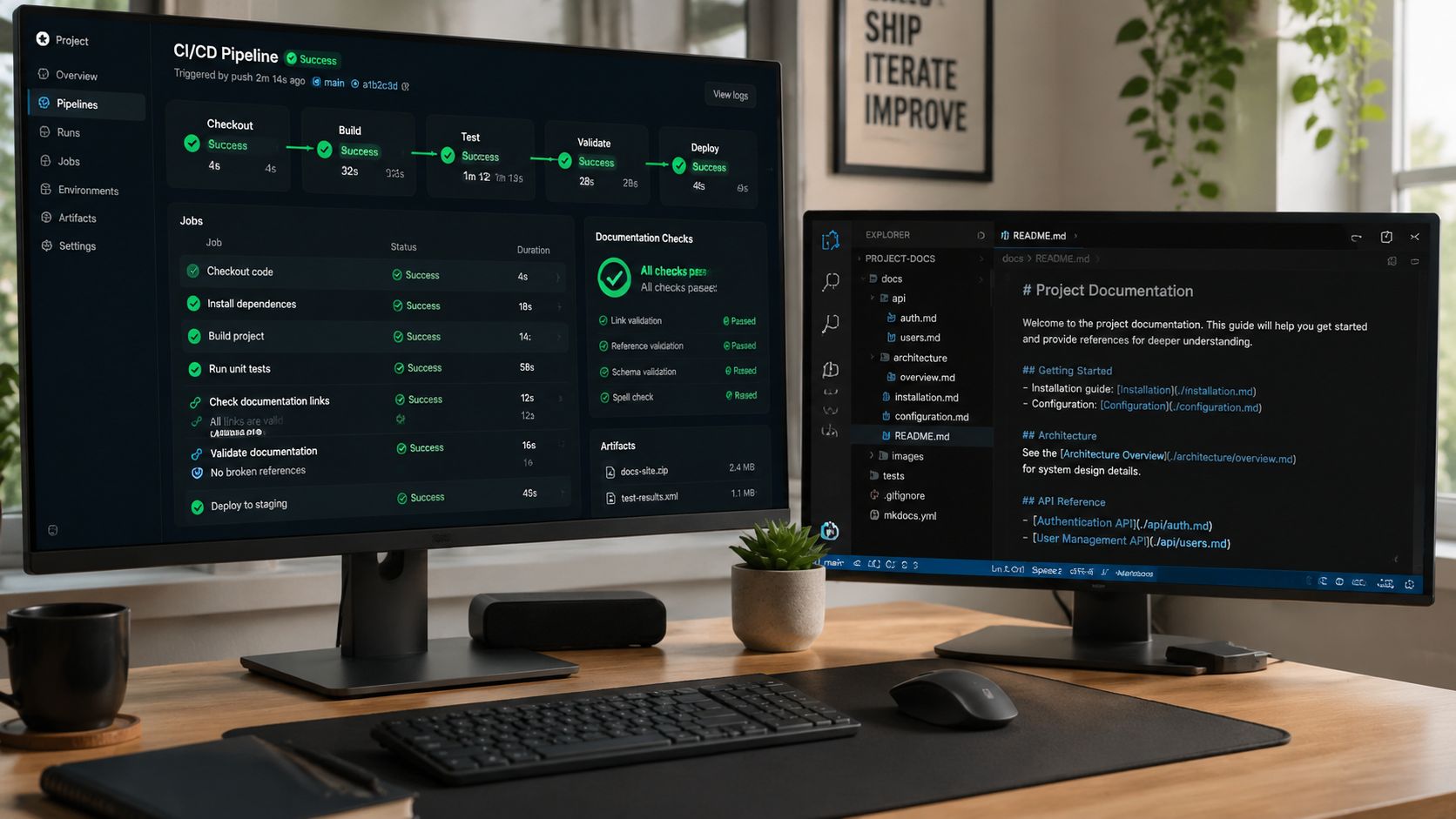
A good benchmark for automation is simple, if it doesn't reduce rework, it's just more tooling. That's also why a support-style knowledge base can be a useful model. The knowledge management guidance from AgentStack reinforces the habit of keeping records easy to find, easy to trust, and easy to maintain, which is exactly what infrastructure docs need.
Traceable As-Builts and Lineage From Design to Operations
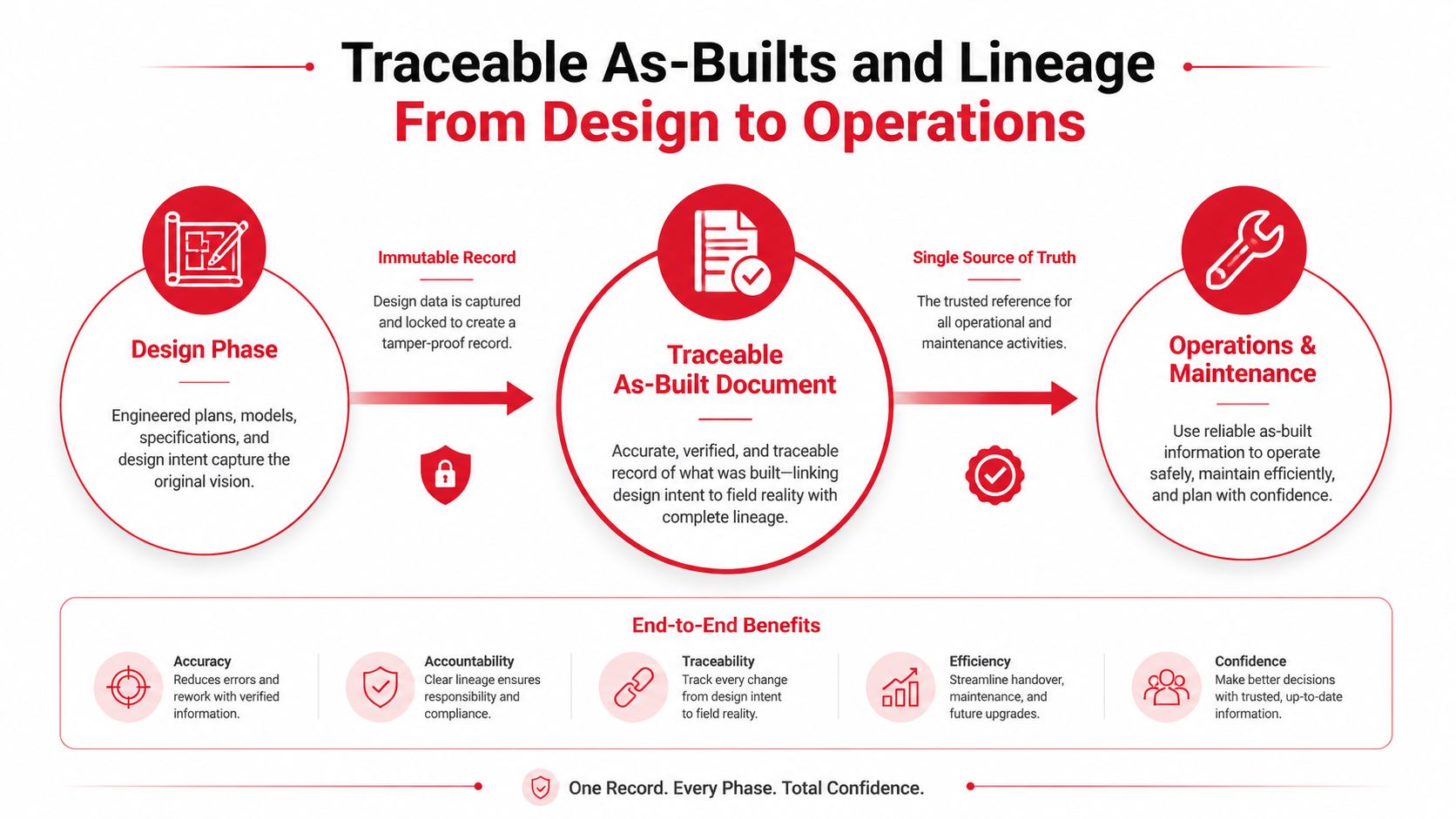
The best documentation in long-lived infrastructure is the traceable as-built. It is not enough to record what got installed. The record has to show which design revision authorized the work, which crew built it, which test accepted it, and which change record altered it after handoff.
That lineage turns a file stack into an operational system. Without it, teams can see the final state, but they cannot explain why it exists. With it, operations, maintenance, and future expansion crews can follow the record back through decisions, field work, and approvals instead of starting from scratch.
What lineage metadata should capture
At minimum, the as-built should point back to the design phase record that authorized the work. It should also show the build completion state, the acceptance evidence, and the operational handoff context. That gives maintenance teams enough context to trace a change without guessing which revision mattered.
A drawing without lineage is a picture. A drawing with lineage is evidence.
For fiber work, splice cards, test results, and route records need to line up cleanly. For wireless, site records, equipment changes, and upgrade history need to stay connected. For data center fit-outs, the cabling, power, and connectivity records need to survive handoff as one coherent package, which is why teams often tie them to broader data center construction documentation practices early instead of trying to reconstruct the record later. If the original engineer leaves, the record still has to tell the story.
How to keep the record alive after closeout
The handoff package should be something operations can use, not a box of PDFs nobody wants to sort through. It needs current as-builts, a clear ownership map, retention and archival rules, and a direct path for future updates. If a record matters enough to build, it matters enough to maintain.
A simple governance loop helps. Assign an owner for each record family. Review freshness on a steady cadence. Track completeness and rework avoided. Archive superseded files, but keep them retrievable under the right retention rules. That approach fits the documentation practices that call for versioning, permanent availability, and retention planning for official records.
Operational truth: the closer documentation stays to field work, the less it costs to trust it later.
A practical checklist for the handoff room looks like this:
- Confirm source-of-truth links: Every current record should point to the authoritative version.
- Check lineage fields: Design revision, build record, and test acceptance should be tied together.
- Mark superseded material: Older files need clear status so they do not get reused by mistake.
- Assign an owner: Someone has to maintain the record after the project team rolls off.
- Schedule review: Freshness checks should happen on a recurring basis, not only after an incident.
- Preserve access rules: Retention, permissions, and archival location should be defined before turnover.
That is the difference between documentation that looks complete and documentation that keeps working. The first one gets archived. The second one keeps the network maintainable.