You already know the pattern. A contractor closes a ticket, the fiber ring comes back clean, the UPS alarm clears, and three days later a hyperscale tenant opens a complaint that nobody can tie back to a specific asset, a specific repair, or a specific technician. The problem usually isn't the equipment itself. It's that the history is scattered across notebooks, spreadsheets, email threads, and a CMMS that only half the crews use.
In telecom and data-center operations, equipment maintenance logs are not paperwork. They're the record that lets you prove what happened, when it happened, and who touched the asset. They're also the source data behind reliability KPIs, so when the log is sloppy, the numbers are sloppy too. That's a bad trade in any fleet, but it gets expensive fast when vendors, regions, and technology stacks all overlap.
Why Equipment Maintenance Logs Matter in Telecom and Data-Center Operations
A tenant reports intermittent packet loss on a cross-connect. The NOC checks alarms, the field team tests optics, and then someone has to prove what happened on the tray, the enclosure, and the upstream port. If one vendor logged the splice closure as a repair, another wrote inspection, and a third skipped the downtime entirely, the crew burns hours rebuilding the timeline instead of fixing the fault.
That is where equipment maintenance logs earn their place in telecom and data-center operations. They turn field activity into usable reliability records across assets that rarely fit one clean category. Mixed fleets, vendor-staffed sites, and cross-region support all depend on the same history to show what changed, who touched it, and what service impact followed. Those records feed MTBF, MTTR, planned maintenance compliance, and the planned-to-unplanned ratio, so sloppy entries distort the metrics analysts use to judge fleet health (Tractian).
Logs are accountability, not admin
In a fiber route, a wireless shelter, and a data hall, accountability often crosses vendor lines. The only workable answer to “what changed?” is a log that captures the date and time, asset ID, maintenance type, parts used, technician name, labor hours, findings, failure codes, downtime duration, and the next scheduled maintenance date (Tractian). That list looks strict because it has to survive escalation, not just routine work. The fields that matter most are the ones that let a second team, a month later, understand the state before the work and after it.
Practical rule: if a record cannot explain the asset's condition before the work and after the work, it will not help in an incident review.
For teams that manage mixed fleets, disciplined logging also cuts the time spent answering audit requests, because you are not digging through contractor email to reconstruct service history. Good documentation discipline works the same way as documentation best practices, clear, consistent, and usable by the next person who has to pick up the job. A splice closure with a poor seal may look fine at first glance, then fail once the environment changes. A maintenance log with missing fields does the same thing during a tenant escalation. If you want a non-infrastructure comparison, even something like living in Atlanta in 2026 only works when the underlying details are organized. In operations, the consequences are uptime, SLA exposure, and customer trust.
Required Fields and Metadata for Audit-Ready Logs
A log entry in a mixed telecom or data-center fleet has to start cleanly, because the record may be read by your team, a vendor crew, and an auditor who was not on site when the work happened. Asset ID belongs at the top. Free-form asset names drift as gear gets replaced, labels change, and vendor-owned equipment sits beside legacy hardware. Date and time matter for the same reason. Sequence is how you sort out whether the failure started with the asset, the technician action, or the change window.
The fields that survive audit pressure
Maintenance type needs a fixed vocabulary. If one contractor writes “PM,” another writes “PM check,” and a third writes “prevention,” the log turns into a cleanup exercise before anyone can trust the history. Parts used and labor hours show what was consumed and how much effort the event took. Downtime duration shows the impact on service continuity, which is what matters during escalation.
The record also has to support later review, not just same-day closure. Findings, failure codes, and the next scheduled maintenance date turn a service note into something you can trend across sites and vendors. For reliability analysis, capture timestamps and inspection parameters such as temperature, pressure, and vibration with calibrated tools, and keep recurring KPI fields such as downtime, MTBF, and MTTR in the same structure, as shown in Limble.
| Priority | Field | Why It Matters | Example Value |
|---|---|---|---|
| Mandatory | Asset ID | Ties the entry to one physical asset | UPS-2B-04 |
| Mandatory | Date and time | Establishes sequence and service timing | 2026-07-18 02:14 |
| Mandatory | Maintenance type | Separates preventive, corrective, and inspection work | Corrective |
| Mandatory | Parts used | Supports spares tracking and failure analysis | Battery module |
| Mandatory | Technician name | Shows accountability and follow-up contact | J. Alvarez |
| Mandatory | Labor hours | Supports workload and cost visibility | 3.5 |
| Recommended | Failure code | Helps identify repeat patterns | Fan failure |
| Recommended | Downtime duration | Feeds reliability metrics | 2.0 hours |
| Recommended | Next scheduled maintenance date | Keeps the next action visible | 2026-08-18 |
| Optional | Photos | Helps with handoff and dispute resolution | Enclosure damage image |
| Optional | Signature block | Useful for vendor sign-off | Contractor initials |
A standardized template across all assets avoids the worst outcome, which is inconsistent records from site to site. The Cryotos best-practices guide notes that if a system cannot produce the full maintenance history for any asset within 5 minutes, it is not audit-ready. If your log cannot answer a basic history request that fast, the problem is governance, not formatting.
For teams that want a tighter documentation process, the same discipline appears in documentation best practices. Keep the record structured enough that another engineer can use it without asking the person who wrote it.
Keep the free-form notes short. Let the structured fields do the heavy lifting.
Sample Templates and Real Entry Examples
A single template can work across fiber, wireless, and power assets if the structure stays consistent. The trick is not making every entry identical. It's making every entry comparable. That means the fields you force into the form need to stay stable, while the details inside those fields can flex by asset class.
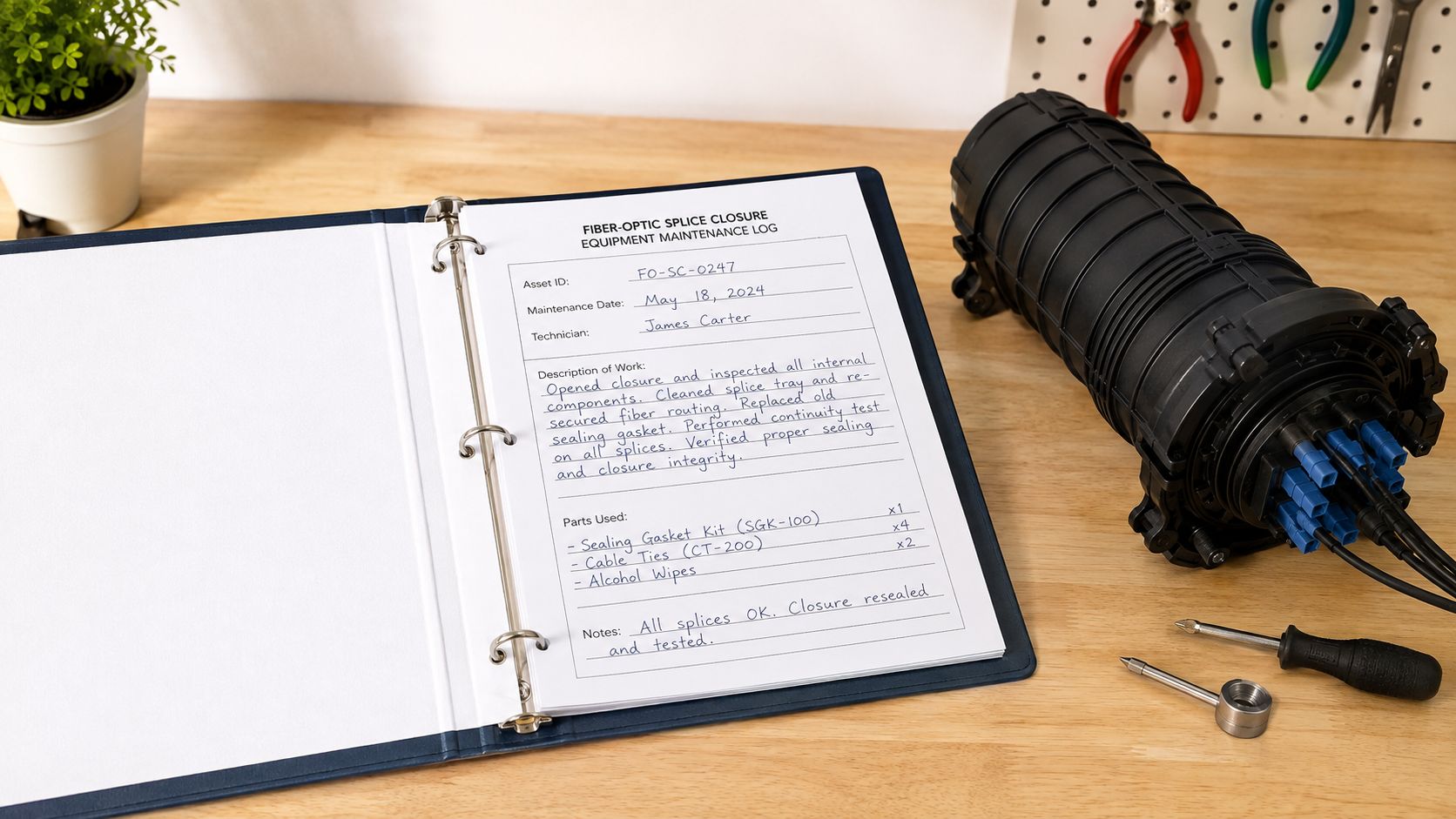
Fiber splice closure entry
For a long-haul splice closure, a strong record might read like this:
- Asset ID: FO-CLOS-114
- Date and time: 2026-07-18 01:40
- Maintenance type: Corrective
- Work completed: Re-spliced damaged fibers after enclosure intrusion
- Inspection data: OTDR trace captured, splice loss documented
- Parts used: Splice sleeves, sealing kit, enclosure gasket
- Technician: M. Reed
- Downtime duration: 1.8 hours
- Next scheduled maintenance date: 2026-08-18
- Network ticket ID: NT-88421
The important part isn't the prose. It's the discipline around the measurements and references. OTDR readings, splice loss, and the ticket ID make the entry usable later, especially if the same enclosure appears in another trouble ticket.
Data-center UPS module swap
A UPS record should be just as structured:
- Asset ID: UPS-A3-02
- Date and time: 2026-07-19 03:05
- Maintenance type: Corrective
- Work completed: Replaced failed power module and verified transfer
- Alarm code: UPS alarm cleared after module swap
- Runtime hours: Logged from local panel at service start
- Battery string voltage: Recorded before and after swap
- Post-service load test: Passed
- Technician: L. Patel
- Next scheduled maintenance date: 2026-08-19
The mistake I see most often is a clean-looking entry with the next-due date left blank. That leaves the log useful for history but weak for scheduling. The other common miss is skipping the post-service verification step, which means the record proves work was done but not that the asset returned to service properly.
Scheduling and Frequency by Asset Criticality
A maintenance calendar that treats every asset the same usually wastes time where it matters least and misses the places where failure hurts. In a multi-site fiber plant or a data-center fleet, a core router, a main UPS, and a tenant-facing access switch do not deserve the same review rhythm as cable trays, brackets, or other support hardware. If a failure can drop a site, force an emergency callout, or trigger a hyperscaler complaint, the log needs to be checked often enough to show whether the asset is drifting before it turns into an outage.
Weekly and monthly cadence for critical assets
For critical assets, weekly reviews usually pay for themselves because recurring issues show up fast. That is where repeated entries for lubrication, seal replacement, or fan replacement start to matter, since they show a pattern instead of a one-off repair. In mixed fleets with vendor techs, in-house staff, and borrowed labor, that cadence also makes it easier to spot when the same problem keeps following the same asset from site to site. For broader fleets, monthly reviews are usually enough to catch drift without drowning the team in admin work.
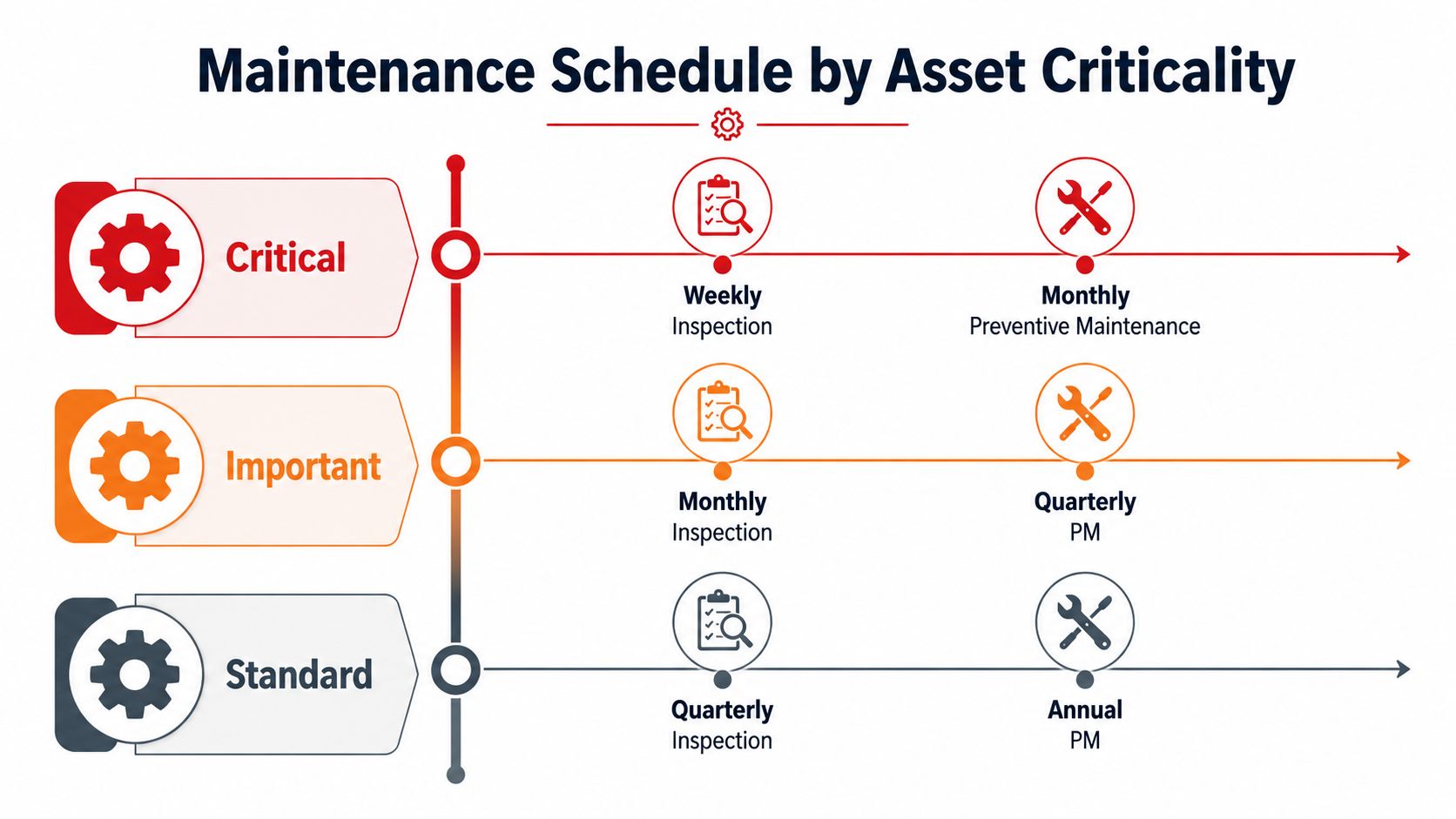
A practical cadence model looks like this:
- Critical assets: weekly inspection, monthly preventive maintenance
- Important assets: monthly inspection, quarterly preventive maintenance
- Standard assets: quarterly inspection, annual preventive maintenance
That pattern is not universal, but it works in the field. It keeps the highest-risk equipment under closer watch while avoiding unnecessary service on assets that do not justify it. For teams trying to coordinate field work across regions, a field-operations approach for construction and technical crews can help clarify why the same calendar should not be applied blindly across every site and asset class.
Let the log change the schedule
The best maintenance calendar does not stay fixed just because it was approved once. It changes when the log keeps repeating the same failure mode. If the same asset keeps needing seal work, or the same fan fails before expected life, the record is telling you the interval is wrong.
Repetition is data. Do not bury it inside a pile of individual work orders.
That is why teams should review critical assets weekly and broader fleets monthly, as noted earlier in the logging guidance. If the same repair pattern keeps coming back, the asset probably needs a different preventive strategy, a deeper root-cause review, or eventual replacement. A calendar without feedback becomes a ritual. A calendar informed by logs becomes an operations tool.
Integrating Logs With CMMS, IoT, and Network Telemetry
A spreadsheet can capture a maintenance event. A CMMS turns that event into part of the operating record, which matters the first time a remote alarm hits and the tech opens a work order that already knows the asset, the site, the task, and the last service note. That reduces rekeying and lowers the odds that a contractor closes the wrong asset or repeats work that already happened.
Make the CMMS carry the structure
Start by standardizing the work-order schema, then lock the fields that drive follow-up. If technicians can leave asset ID, task type, parts used, or completion status blank, the system fills up with records that look complete on the surface but fail when someone tries to compare failure patterns or trace a repeat incident. The workflow should require those fields before closure, because partial entries weaken benchmarking and hide recurring defects.
Once the schema is stable, connect it to the systems already creating work. IoT sensors can trigger alerts, network monitoring tools can open tickets, and the CMMS can pull in asset context automatically. In a multi-vendor fleet, that means field crews do not have to learn a different data model for every customer, they work from one log shape and one set of required fields.
Use one schema across crews and platforms
Contractor management often falls apart at the handoff point. One crew wants a mobile app, another uses a desktop form, and a third still tries to close work in email. A controlled data model keeps those inputs aligned even when the capture method changes. Mobile entry, API integrations, and webhook triggers all work better when they feed the same fields.
For a practical view of how this plays out across technical work, tech in construction shows the same discipline in field coordination. Structured inputs let different crews contribute to the same operational record without wrecking consistency.
If the form changes every time a contractor changes, the system will never stabilize.
Real-time integration also improves response quality. Alarm timestamps, sensor snapshots, and work-order history let the dispatcher see what failed, who owns it, and what happened last time. That turns logs from a static archive into an active decision layer, especially when you need to build GDPR-compliant retention policies around records that now move across CMMS, monitoring, and vendor systems.
Audit Readiness and Retention Policies
Audit readiness starts with retrieval speed. If a team cannot pull a complete asset history quickly, the record system is too fragile for a serious review. In a mixed telecom and data-center fleet, that usually means someone can find the work order, the asset ID, the failure note, and the sign-off without chasing five different systems.
A practical standard is simple. If a system cannot produce the full maintenance history for any asset within 5 minutes, it is not audit-ready.
Retain the records that prove continuity
Retention policy has to match the risk profile of the asset. Operational logs should stay available long enough to support warranty claims, incident reviews, and vendor disputes. Safety-critical assets, power systems, and structural components usually need longer retention because missing history has a higher cost there. If your organization works in regulated environments, set retention by asset class instead of forcing one blanket rule across everything.
A good policy also separates operational retention from legal hold. Operational retention is the normal archive schedule for everyday maintenance history. Legal hold pauses deletion when there is an active incident review, insurance matter, or regulatory request. That split matters in shared sites, because vendor crews, site ops, and compliance teams often need the same record for different reasons.
Protect the record, not just the equipment
Access control matters because maintenance history gets sensitive quickly. Vendor notes, failure codes, and site-specific details can all become useful in a dispute, so the archive needs permissions, not open access. Immutable backups help too, because the log serves as evidence first and convenience second.
For teams formalizing retention rules, build GDPR-compliant retention policies is a useful reference point for thinking about lifecycle control, even if your own program operates under different legal requirements. The larger lesson is straightforward. Define what you keep, who can change it, and when the clock starts for removal.
For leaders who need a cleaner way to judge whether those rules hold up across sites, performance benchmarking for maintenance records helps turn record quality into something the team can compare and defend across vendors, regions, and asset classes.
A retention policy that nobody can explain is usually a retention policy that will not survive an audit.
KPIs, Dashboards, and Reporting From Your Logs
The numbers matter most when a site lead can defend them in front of operations, finance, or a hyperscaler audit. MTBF, MTTR, planned maintenance compliance, and the planned-to-unplanned ratio only mean something if the entries behind them are complete and consistent. If downtime is missing, if a corrective repair is entered as preventive, or if the asset ID is wrong, the dashboard just repackages bad data in a cleaner view.
Build the KPI stack from the log fields
MTBF depends on accurate failure history and downtime records, because the calculation only works when the underlying events are captured correctly in the log. MTTR relies on the same discipline, since repair start and finish times have to be visible for the metric to say anything useful. Planned maintenance compliance should come from the ratio of planned tasks completed on time versus planned tasks scheduled, and that only works if the maintenance type and due date are recorded the same way across sites and vendors.
The planned-to-unplanned ratio tells the clearest story in a mixed telecom and data-center fleet, because it shows whether the operation is getting ahead of work or just chasing failures. If the log overweights corrective entries, the ratio shows a crew that is living in reaction mode. The root cause is discipline at the entry level, not a software limitation.
Here's the dashboard split I'd use in a multi-site environment where fiber, power, cooling, and network gear all sit under one reporting layer:
- By region: so weather, contractor availability, or logistics do not hide inside the averages
- By asset class: so fiber, power, cooling, and network gear do not get blended together
- By vendor: so recurring quality issues stay visible in the support chain
- By criticality: so the most sensitive assets get the closest review
Use the dashboard to make operational decisions
A good dashboard does not stop at display. It should change decisions. Trend lines can justify capital replacement when an asset keeps generating corrective work, and the same history can support warranty or insurance claims when a component fails early. It also gives you better footing in vendor conversations, because the record shows whether missed service, repeated part swaps, or slow response times are recurring patterns.
For teams building a formal reporting layer, performance benchmarking is where the discipline starts to pay off. The point is not a pretty chart. It is giving operations, finance, and client teams the same view of what the fleet is doing, site by site, vendor by vendor.
A rollout that holds up usually follows a simple sequence. Standardize the template first, configure the CMMS second, train the field crews third, then run a 30, 60, 90-day review to catch adoption gaps before they harden. Assign an owner for each asset class, set an escalation path when log quality slips, and bring contractor staff into the same process instead of letting them run a parallel one. Quarterly log-quality audits keep the program honest, and crews who consistently produce clean records should be recognized for it, because the best systems only stick when the people using them see the point.